How to Create AI Videos Without Looking Like a Robot

how to create ai videos
Welcome offer — 56% OFF


Learn how to create ai song from idea to final track with AI tools, prompts, and production tips.
You know that feeling when a perfect melody pops into your head, but you have no idea how to get it out and into the world? We've all been there. Forget spending years learning music theory or wrestling with complicated software—AI is here to act as your personal translator, turning those fleeting ideas into actual songs.
This is your new secret weapon. It’s an instrument that lets you create an AI song in minutes, not months.
That brilliant tune you've been humming is way closer to being a finished track than you think. I'm going to walk you through how to go from a simple concept to a polished song you can share with anyone, no music degree required. It’s a complete game-changer for creators.
The barrier to entry for making music has officially crumbled. You don't need a million-dollar studio anymore. This isn't just a niche trend, either—the global generative AI music market was valued at USD 569.7 million in 2024 and is expected to rocket to nearly USD 2.8 billion by 2030. In fact, over 60% of musicians are already weaving AI into their creative process.
Let’s get one thing straight: AI isn't here to replace artists. It’s more like a super-talented creative partner. Think of it as a tool that handles all the tedious technical stuff, freeing you up to focus on what really matters—the vision. You’re the director, and the AI is your infinitely patient orchestra.
This whole process gives you the power to whip up original soundtracks for literally any project. We're talking custom music for TikTok videos, YouTube intros, podcast themes, or even just a personal passion project, all in a tiny fraction of the usual time.
Over the next few sections, we're going to dive deep into the workflow using SendFame’s AI Music Generator. I'll show you exactly how to:
Turn abstract moods like "cyberpunk chase scene" into real musical ideas. Craft killer prompts that get you incredible results right out of the gate. Tweak, refine, and polish your track until it’s absolutely perfect.
Ready to turn your imagination into sound? Let’s get to it.
Jumping into an AI music generator without a clear idea is like trying to cook a gourmet meal by just throwing random ingredients into a pot. You might make something, but it probably won't be what you were hoping for. Before you type a single word, take a moment to be the creative director of your own track.
What's the vibe you're actually chasing? Don't just think "happy" or "sad." Think about the scene. Are you crafting a soundtrack for a high-energy workout montage on TikTok? That calls for something completely different than, say, a moody, atmospheric lo-fi beat for your late-night study vlog. The context is your compass.
Here’s the secret: AI doesn't understand "nostalgia" or "excitement" the way we do. It understands musical ingredients. Your job is to be the translator, turning that abstract feeling into a concrete recipe the AI can follow.
Let's walk through a real-world example. Say you're making a short travel video of a scenic coastal drive at sunset.
The Vibe: "A nostalgic sunset drive along the coast." The Genre: This feeling immediately brings to mind something breezy and reflective. Indie Pop or Chillwave would be perfect fits. The Mood: Words like "wistful," "uplifting," and "dreamy" are your keywords here. They're specific and descriptive. The Instruments: What does that scene sound like? I'm picturing a clean electric guitar melody, maybe some soft synth pads like clouds, and a simple, laid-back drum machine keeping time.
See what we did there? We went from a fuzzy idea to a solid creative brief. Now the AI has clear instructions to work with.
Seriously, this brainstorming part is the most critical step. It’s what separates a generic, forgettable AI track from a piece of music that feels like it was made just for your project. Spending five minutes on this upfront will save you so much time tweaking things later.
Think about where this music will live. A punchy podcast intro needs to grab attention without being annoying. The background for a gaming highlights reel needs to feel epic and build tension. When you start with the end goal in mind, you're not just creating a song; you're creating the perfect sonic backdrop for your content.
Think of your prompt as a direct conversation with the AI. You're in the director's chair, and it's your job to tell your infinitely talented (but very literal) musician exactly what to play.
If you toss in a lazy prompt like 'sad piano song,' you’re going to get a bland, forgettable tune. It's predictable. But a rich, detailed prompt? That’s how you get the AI to create an AI song that actually feels special.
Honestly, mastering the art of the prompt is the single most important skill for getting great results. The difference between a basic request and a finely crafted one is just staggering.
Compare "rock song" to "energetic 80s stadium rock, driving drum beat, anthemic electric guitar solo with heavy reverb, fast tempo, reminiscent of Queen." The second prompt doesn't just suggest a genre; it paints a complete sonic picture. It gives the AI a world to live in.
Your prompt is a recipe. The more precise your ingredients, the better the final dish will taste. Instead of just one or two words, you need to build your request by layering specific elements.
Here’s a simple mental framework I use:
Genre & Style: Start with the big picture. Is it synthwave, acoustic folk, boombap hip-hop, or orchestral cinematic? Get specific. Mood & Vibe: This is where you inject the soul. Use evocative words like melancholy, triumphant, dreamy, intense, or serene. Instrumentation: Name the specific instruments you hear in your head. Don't just say "guitar," say gritty bassline, delicate piano arpeggios, or punchy 808 drums. Tempo & Pacing: Guide the energy of the track. Terms like slow and hypnotic, upbeat and danceable, or a simple mid-tempo groove make a huge difference.
Before you even start writing, it helps to lock in these core ideas.
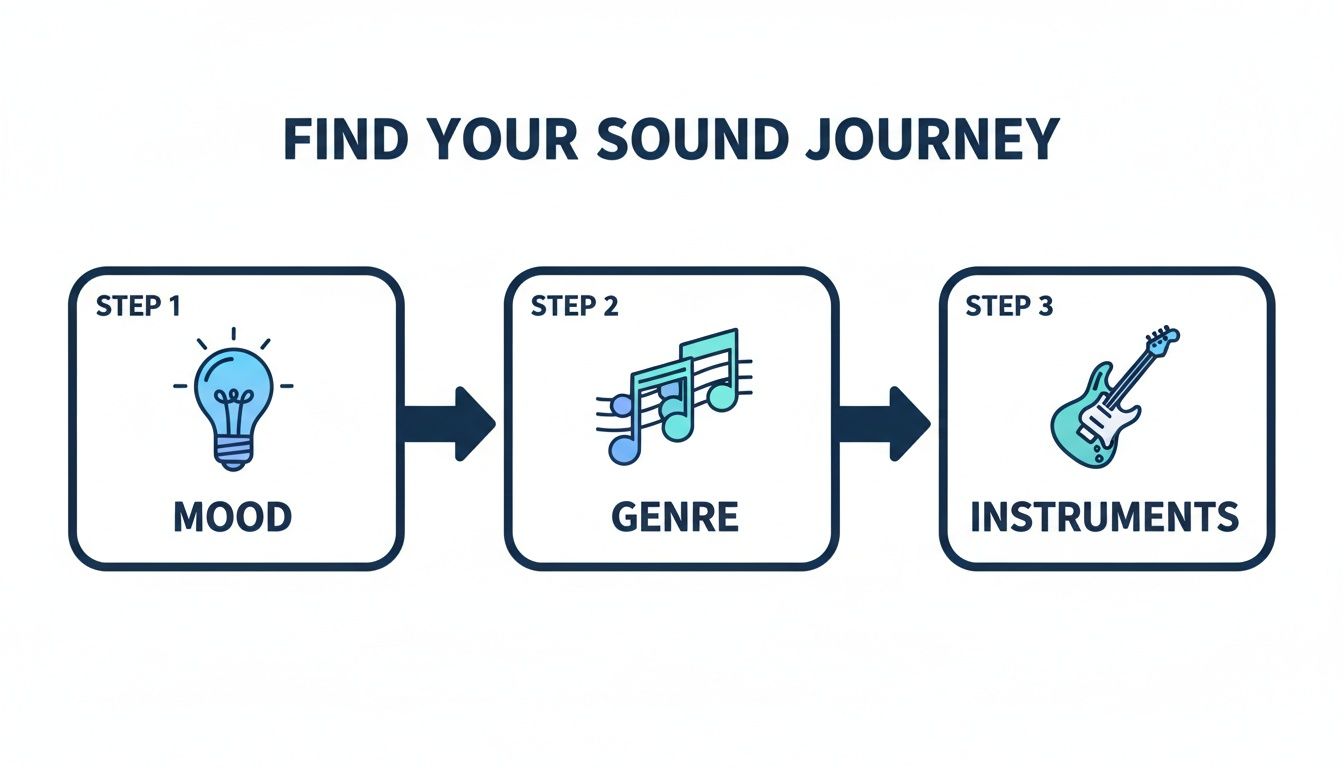
Nailing down the mood, genre, and instruments first gives you a rock-solid foundation for a killer prompt.
Why is this so crucial? Without detailed guidance, AI tends to fall back on the most common, generic patterns. A fascinating 2025 MIT Media Lab study found that over 70% of AI-generated tracks share nearly identical chord progressions. This leads to a sea of musical sameness. Your detailed prompt is the key to breaking out of that mold and getting something that sounds genuinely original.
To help you get started, here's a simple framework you can use to build out your prompts from scratch. Just fill in the blanks with your own ideas.
| Prompt Element | Description | Example |
|---|---|---|
| Primary Genre | The main musical category. | Cinematic, Lofi Hip-Hop, 80s Synthwave |
| Mood/Vibe | The emotional feeling or atmosphere of the song. | Epic and inspiring, Chill and sleepy, Nostalgic and dreamy |
| Key Instruments | The specific instruments that should be featured prominently. | Soaring string section, powerful brass, Jazzy piano, upright bass, soft drums |
| Tempo/Rhythm | The speed and feel of the beat. | Slow, dramatic build-up, Mid-tempo boom-bap beat, Fast, driving four-on-the-floor |
| Influences | Artists, composers, or styles to borrow from. | In the style of Hans Zimmer, Reminiscent of Nujabes, Daft Punk-inspired |
| Texture/FX | Extra sonic details to add character. | Warm vinyl crackle, Heavy reverb on the snare, Distant city ambiance |
This table is just a starting point. Mix and match elements, and don't be afraid to add your own categories to get even more specific.
Pro Tip: Seriously, don't be afraid to get weird. Add textures like "soft vinyl crackle" or "distant city ambiance." Mention an artist's influence, like "in the style of Daft Punk," to give the AI a strong stylistic anchor. These little details are what bring the track to life.
If you really want to go down the rabbit hole, check out our comprehensive guide on how to write an effective AI music prompt. The more you experiment with layering these details, the closer you’ll get to pulling that exact sound out of your imagination and turning it into a real track.
Alright, the AI has served up its first draft. Now the real fun begins. This is where you, the artist, take the driver's seat and transform a neat AI-generated idea into a polished, undeniable banger.
Let’s be real: the first version is almost never the version. That's totally normal. Treat it like a musical sketchpad. Put on your producer hat and listen with a critical ear. Maybe that synth line sounds a little too much like an 80s video game, or the kick drum is hitting like a wet noodle.
The best part about tools like SendFame is that you’re not locked into anything. You have total freedom to adjust, regenerate, and experiment until it hits just right.
Here's a pro tip: don't toss the whole thing out just because one part isn't working. The key is to zero in on what you like and what you don't, then iterate.
Love the verse but the chorus falls flat? Easy. Isolate that chorus section and hit regenerate. Try adding a new descriptor to your prompt, like "more anthemic" or "stripped-back piano melody." The beat just isn't grooving? Reroll just the drums. Tell the AI you want "a tight, punchy trap beat with crisp hi-hats" or "a chill, laid-back lo-fi groove." Can't decide between two good ideas? Generate a few different versions of the same section. You might end up loving the bassline from one attempt and the vocal melody from another.
This back-and-forth is how you truly create an AI song that has your unique stamp on it. It’s less about just pressing a button and more about a creative partnership between your vision and the AI’s muscle.
Think of yourself as a DJ with an endless crate of records to sample from. You can grab the sick bassline from this version and the soaring synth from that one, stitching them together to build the perfect track. Many modern AI tools for music production are built for exactly this kind of creative surgery, which makes the whole process feel less like editing and more like playing.

Alright, your AI-generated track is banging, but don't hit "publish" just yet. We need to add that final bit of studio magic. This last step is all about mastering and exporting, which sounds intimidating, but I promise it’s simpler than it seems.
Mastering is just the fancy term for making sure your song sounds awesome everywhere—from cheap earbuds to a full-blown club sound system. Luckily, SendFame’s generator handles most of the technical stuff automatically. All you need to do is give it one last listen. Does any part sound weirdly quiet or unpleasantly loud? Now's the time to catch it.
Happy with how it sounds? Perfect. Now it's time to export your masterpiece. The file format you pick really depends on what you're planning to do with it.
WAV files are your top-shelf option. They’re uncompressed, meaning you get every single detail of the sound. If you're uploading to YouTube, Spotify, or any other platform where quality is king, this is the one you want. MP3 files are the workhorse. They’re smaller because they're compressed, which makes them ideal for things like podcast jingles, background music on a website, or a quick share on social media where file size is more important than audiophile-level quality.
Think of this last stage as getting your song dressed for the occasion. You wouldn't wear a tuxedo to the beach, right? Choosing the right format ensures your creative vision sounds exactly as you intended, no matter where people are listening.
The ability to create an AI song in minutes is a game-changer. It's why custom audio is exploding in ads, podcasts, and social content. This boom has sent the royalty-free music market soaring—it hit a massive USD 1.4 billion in 2024 and is expected to cross USD 2 billion by 2030. You can dive deeper into this trend in this great analysis of AI's impact on music.
With your track exported, you're officially ready to go. You can layer some vocals on top, drop it into your next video edit, or even create some killer artwork for it with SendFame’s AI album cover generator. Go ahead, share it with the world and let your creation shine.
Jumping into AI music generation can feel a bit like learning a new instrument, so it's totally normal to have questions swirling around. Let's clear the air on some of the things people usually ask when they're about to create an AI song.
First up, the big one: legality. "Can I actually use this stuff?" In almost all cases, yes. When you make a track with a tool like SendFame, you're usually given a license to use what you create. It’s always a good idea to skim the terms, though, especially if you’re thinking about using your new masterpiece in a commercial project.
That's a fair concern! Nobody wants their epic anthem to sound like a dial-up modem singing karaoke. But today's AI is light-years beyond that. The trick to getting a truly unique and human-sounding track lies in how you talk to the AI.
The more vivid your prompt—think specific moods, instruments, and styles—the less generic the output. Think of yourself as the director and the AI as your orchestra. Your creative vision is what keeps it from sounding like elevator music.
The real magic happens when you treat it like a collaboration. The AI brings the technical skill, but you bring the taste. Go ahead and regenerate a section you don't love, Frankenstein a few different versions together, or layer your own vocals on top. It’s a partnership.
People also wonder if you need to be a musical prodigy to get started. Let's break that down.
Music theory? Not a prerequisite. That's what the AI is for. Play an instrument? Nope. If you can type, you're good to go. Fancy production software? No need. The generator handles all the technical heavy lifting.
All you really need is the ability to describe the sound that's stuck in your head.
Once you’ve crafted the perfect AI track, you might start thinking about what comes next. If you're curious about how creators are getting their projects off the ground, you can explore topics like the Rhythms Of Success: The Impact Of Crowdfunding On The Music Industry to get a sense of the modern music landscape.
Ready to move from asking questions to making music? Give SendFame’s AI Music Generator a spin and hear your ideas come to life. Start creating your first AI song now!
Create Epic

SendFame

Create Epic with SendFame!
Questions: info@sendfame.com