The Top 12 Best AI Music Generator Online Tools for 2026
ai music generator online
Welcome offer — 56% OFF


Ready to learn how to make AI art? This guide breaks down everything from choosing the right tools to mastering prompts. Start creating amazing art today!
Learning how to make AI art sounds complicated, but it's not. The core idea is brilliantly simple: you describe an image you want to see, and a powerful AI tool brings your words to life. Forget spending years learning your way around dense, complex software—your imagination is the only real skill you need.
Think of this guide as your all-access pass to creating stunning visuals from scratch. We're diving into a world where anyone can be a visual artist, whether you’re dreaming up a custom graphic for your next marketing campaign, a scroll-stopping social media post, or maybe even the cover for your band's next album.
We’re leaving the dry, technical jargon at the door. This is all about the pure creative fun of turning simple text prompts into bona fide masterpieces. Tools like Midjourney and SendFame are at the forefront, giving everyone intuitive platforms to make their ideas a reality in an instant.
This isn't just some niche hobby; it's a fundamental shift in how we create. The art world was turned upside down when tools like DALL·E 2 and Midjourney first hit the scene, kicking off an incredible boom in AI-generated imagery.
Believe it or not, we’re now churning out a mind-boggling 34 million AI images every single day. Since 2022, humans have generated over 15 billion AI images. For perspective, it took traditional photography about 149 years to hit that same milestone.
For content creators, this is huge. You can now whip up custom visuals in seconds, potentially cutting your production time by up to 90%. If you want to dig into the numbers, Fortune Business Insights has some great data on the market's explosive growth.
The big takeaway is this: if you can describe it, you can create it. This newfound accessibility is what makes AI art so incredibly exciting for creators of all stripes.
I wrote this tutorial to be your hands-on companion as you get started. We'll cover everything from picking the right tool for the job to crafting prompts that actually deliver the goods.
Here’s what you’ll learn:
Picking the Right Tools: We’ll break down the most popular platforms so you can find one that vibes with your style and goals. Mastering the Art of the Prompt: This is where the magic happens. You’ll learn the secret language that coaxes incredible images out of the AI. Refining Your Creations: I'll show you a few post-production tricks to polish your art and make it truly shine. Putting It All to Work: We’ll look at real-world workflows for creating branded content, personal projects, and a whole lot more.
By the end, you'll understand that AI isn't just about making cool pictures; it's about giving your own creativity a massive boost. For a broader look at the topic, check out our guide on what is AI-generated content and how it’s shaking things up everywhere.
Let’s get started.
Alright, let's get to the fun part: picking your weapon. Finding the right AI art generator is a bit like a chef choosing their favorite knife. There are tons of options out there, but a few stand out from the crowd, and the "best" one really boils down to what you’re trying to cook up.
You don't need to get lost in the sea of choices. The secret is knowing what you want to create. Are you chasing photorealistic portraits that fool the eye? Or maybe you're dreaming up wild, whimsical scenes straight out of a fantasy novel?
Your creative goal is your compass. Let’s break down the heavy hitters so you can find the perfect tool for the job and get right to making magic.
When you dive into the world of AI art, you'll hear three names whispered in every corner: Midjourney, Stable Diffusion, and user-friendly powerhouses like SendFame. Each one offers a completely different vibe and serves a different kind of creator.
Midjourney is the artist's darling. It’s famous for generating jaw-dropping, cinematic images that feel like they have a soul. The whole thing runs on Discord, which is a bit quirky at first, but the sheer beauty of its output is legendary. If you want your art to look like a still from an epic fantasy film, this is where you go.
Then there’s Stable Diffusion, the open-source beast for tinkerers and control freaks. This one is for anyone who wants to pop the hood and mess with the engine. The learning curve is no joke, but the payoff is total control. You can train your own models, fine-tune every little detail, and achieve styles nobody else can.
And for everyone else? You've got refreshingly simple tools built for speed and fun. Platforms like SendFame put the power in your hands without the headache, letting you generate incredible images, craft celebrity personas, and even whip up videos. It’s a godsend for content creators who need amazing results without a PhD in prompt engineering.
The trick is to match the tool to the task. You wouldn’t use a sledgehammer to hang a picture, right? Same idea here.
To make things a little easier, I've put together a quick comparison to help you see how they stack up.
Here's a quick comparison of popular AI art platforms to help you choose the right one for your creative needs.
| Platform | Best For | Ease of Use | Key Features |
|---|---|---|---|
| Midjourney | Highly stylized, artistic, and cinematic images. | Moderate | Operates via Discord commands; known for its distinct aesthetic. |
| Stable Diffusion | Ultimate customization and technical control. | Difficult | Open-source; requires local setup or web interface; endless models. |
| SendFame | Quick, high-quality visuals and creative projects. | Easy | Intuitive interface; tools for images, video, and celebrity styles. |
Ultimately, the best way to find your match is to just start playing.
Look, picking a generator isn't a lifelong blood oath. Most of us hop between different platforms depending on the project. Experimentation is half the fun! For a much deeper look at the pros and cons, our guide on the best AI art generator breaks it all down.
To get you started, think about what you really want to do.
For Jaw-Dropping Artistry: If your goal is to create stunning, gallery-worthy images with a powerful, signature style, start your journey with Midjourney. Its community and consistently beautiful results make it a favorite for a reason. For Total Creative Freedom: If you're the type who loves to get their hands dirty and control every last pixel, Stable Diffusion is your playground. The community has created custom models for literally any style you can dream of. For Fast and Fun Content: If you're a marketer, an influencer, or just someone who wants to make awesome stuff without the technical grind, a tool like SendFame will feel like a breath of fresh air. It’s all about getting you from idea to finished product in record time.
Want to try before you buy? A great way to get a feel for this stuff is to mess around with some of the best free AI image generators. It’s the perfect, no-risk way to dip your toes in the water and see which one just clicks for you.
Alright, this is where the magic happens. A killer prompt is the secret sauce behind every single piece of mind-blowing AI art you've ever seen. It’s the difference between getting a blurry, generic blob and an image so perfect you’d swear it was pulled directly from your imagination.
Forget tossing vague, one-word ideas at the AI and hoping for the best. To really get the hang of this, you need to think like a director and speak the AI’s language. That means getting specific, descriptive, and frankly, a little bit bossy.
And trust me, this is more than just a fun hobby; it's a seriously valuable skill. The AI in Art and Creativity market is on an absolute rocket ship, projected to smash USD 161.11 billion by 2034. Image generation is the biggest slice of that pie, at a massive 61.8%. The pros, who make up 42.6% of the users, aren't getting replaced—they're just supercharging their workflows to spit out incredible ideas at lightning speed. You can read more about the market's explosive growth here.
Think of a prompt as a recipe. The more precise your ingredients and instructions, the better the final dish. A truly great prompt is built from a few key elements that work together to guide the AI with pinpoint accuracy.
A basic prompt might just have a subject, like "a cat." A killer prompt, on the other hand, builds a whole world around that cat. It paints a vivid picture with words, giving the AI everything it needs to render a masterpiece.
Let's break down the core components:
Subject: This is the "who" or "what" of your image. Don't be shy with the details! Instead of just "a woman," try "a joyful young woman with a spray of freckles and wild curly red hair." Action/Setting: So, what's your subject doing, and where are they? "Sitting in a cozy, cluttered bookstore cafe on a rainy afternoon." Style: This is your artistic direction. Are you going for a photo, a painting, or something totally out there? "In the style of a whimsical watercolor illustration." Lighting & Mood: How is the scene lit? What feeling are you trying to capture? "Warm, soft light filtering through the window, creating a peaceful and nostalgic mood." Composition: Where's the subject in the frame? What's the camera angle? "Close-up shot, looking over her shoulder as she reads an old, leather-bound book."
String those together, and you've got a prompt that tells a story. This detailed approach is the absolute key to getting results you'll actually want to use. For a deeper dive with more examples, check out our guide on how to generate AI images from text.
Let's put this into practice. Imagine you're a content creator who needs a stunning hero image for a blog post about space exploration.
Your first thought: a spaceship flying through space
The AI will give you exactly that—a generic, probably boring spaceship against a black background. It's technically correct, but completely uninspired. Yawn.
Now, let’s pump some life into it using the components we just covered.
Our killer prompt: Epic wide shot of a sleek, futuristic exploration spaceship with glowing blue engines, soaring through a vibrant, swirling nebula of cosmic dust in shades of purple and gold, cinematic lighting, hyper-detailed, 8K resolution.
See the difference? We didn't just ask for a spaceship. We gave it a personality ("sleek, futuristic"), a specific environment ("vibrant, swirling nebula"), a color palette ("purple and gold"), and technical commands ("cinematic lighting," "8K resolution").
This is how you go from a vague concept to a show-stopping visual. You're not just prompting; you're world-building.
Once you get the hang of it, you'll start building your own mental library of keywords that instantly level up your work. Think of these as your magic words—powerful descriptors that tell the AI exactly what kind of quality, style, and mood you're after.
Here are a few of my go-to categories to get you started:
For Jaw-Dropping Quality: hyper-realistic ultra-detailed 8K resolution photorealistic For Cinematic Flair: cinematic lighting dramatic lighting golden hour volumetric lighting For Artistic Styles: in the style of Van Gogh cyberpunk aesthetic watercolor painting minimalist line art Art Deco For Camera Angles: wide-angle shot macro shot Dutch angle low-angle shot
Start sprinkling these into your prompts and watch the quality of your images skyrocket. The best way to learn is by doing, so grab these keywords, fire up your generator of choice, and just start playing. You'll be amazed at what you can create.
Hitting the "generate" button is just the start of the conversation, not the end of it. Think of that first image as the AI's opening statement. Now it's your turn to guide the creative process and shape that initial idea into something truly spectacular. This is where the real magic happens, and you absolutely don't need to be a digital art wizard to pull it off.
Most AI art platforms know you'll want to tweak things, so they include built-in tools to help you out. This is your first stop. Before you even dream of exporting the image, see what you can do right there on the platform. Iterating on what you already have is way faster and more efficient than starting from a blank slate with a new prompt.
Let's talk about the low-hanging fruit. The built-in features are designed for quick, impactful edits that can elevate your image without needing a separate program. They’re your best friend for getting closer to that perfect shot.
You'll almost always run into two incredibly useful options:
Variations: So close, yet so far? Maybe you love the overall vibe but the character's pose is a little stiff. Hitting 'Variations' is like telling the AI, "More like this, please!" It'll spit out a new batch of images based on your favorite one, exploring slightly different compositions and details. It’s a fantastic way to fine-tune without starting over. Upscaling: The first images you generate are typically on the smaller side to keep things speedy. Once you’ve landed on "the one," it's time to upscale. This isn't just a simple "make bigger" button; a good upscaler intelligently adds detail, sharpens edges, and gets your image ready for high-quality use on your blog, social media, or even in print.
Honestly, these two simple, one-click fixes can often solve 80% of your refinement needs. It's amazing how much you can accomplish in just a few seconds.
Alright, let's be real: AI gets weird sometimes. It has a knack for fumbling details that humans take for granted, especially when it comes to anatomy. The number one offender? Hands. You're going to see some wild stuff—six-fingered nightmares, fingers bending in impossible directions, and hands that look like they're made of melted wax.
Faces can also be tricky. You might get slightly distorted features, blurry eyes, or a subtle asymmetry that just feels... off. Don't panic! These are common, and more importantly, they are fixable.
The secret that separates amateur AI artists from the pros is a willingness to do a little post-production cleanup. Don't be afraid to take your image into a simple photo editor to correct the AI's little mistakes.
You don't need a Photoshop subscription and a decade of experience, either. Many of these issues can be patched up with basic tools found in free editing software. A 'clone stamp' or a 'healing brush' tool is your best friend for zapping extra fingers or smoothing out a weird patch of skin. Think of it as digital blemish control.
Ready for the really cool stuff? For more surgical precision, you need to get familiar with AI-powered features like inpainting and outpainting. These tools are absolute game-changers.
Inpainting lets you draw a mask over a specific part of your image and tell the AI to regenerate only that area. Got a character with a wonky eye? Just select it, type a new prompt like "a sparkling green eye," and the AI will fix it while leaving everything else perfectly intact. Outpainting is the opposite—it expands your canvas. If you've generated the perfect portrait but wish it was a wider landscape shot, outpainting lets the AI intelligently imagine and create the world beyond the original borders. It can extend the scene in a way that feels completely natural.
Learning to use these features is what takes you from a casual user to someone who is truly directing the AI. Many generators are starting to build these in, but for the ultimate level of control, a dedicated tool like SendFame's AI image editor gives you the power to nudge every pixel into its perfect place. This is how you take full creative control back from the machine.
Alright, let's get down to brass tacks. How do you actually use this stuff to power your content calendar without pulling your hair out? Think of these as creative blueprints, tried-and-tested ways to make AI art work for you.
Imagine you're gearing up for a big social media launch. The goal isn't just to make pretty pictures; it's to create a vibe that's unmistakably yours. You can start by pairing your existing product shots with wild, abstract backgrounds that AI is brilliant at dreaming up. This gives you a signature look that stops the scroll.
First thing's first: jot down your top three brand attributes. Are you "bold, modern, and minimalist"? Or maybe "dreamy, organic, and warm"? Use these as the core of your prompts.
Instead of a generic request, try something like, ‘vibrant teal gradient background with a sleek white logo at the center, minimalist, clean lines’. See the difference? You’re giving the AI a style guide to follow.
A pro tip is to lock in your camera angles across a series of images. This simple trick creates a powerful sense of visual cohesion. I usually generate three or four variations of a prompt, pick the one that’s closest to my vision, and then upscale it for that crisp, professional finish.
Stick to your color palette. This is non-negotiable for brand recognition. Lean on minimalist keywords. They keep the output clean and on-message. Get specific! Use prompts that are ultra-detailed to sidestep those generic, stock-photo-looking results.
Album covers are a whole different beast. It's all about mood and concept. Before you even type a word, you should have a mood board—or at least a few keywords that capture the album's soul. Let's say you're going for something retro. A good starting point would be ‘retro synthwave vibes with neon grids, cosmic sky, 80s aesthetic’.
My process for this usually involves a bit of exploration. I’ll fire off a basic prompt and generate about five samples just to see what sticks. From there, I pick the strongest contender and start refining the prompt, layering in more detail about mood and texture.
Sometimes you get almost the perfect image, but the logo is just a bit off or a color is clashing. That's where inpainting is a lifesaver. You can just mask the problem area and tell the AI exactly what to fix.
Once you’re happy with the result, upscale it to 4K resolution. This ensures it looks just as stunning on a vinyl sleeve as it does on a Spotify playlist. Honestly, this iterative method can shave hours off the design process compared to doing it all manually in Photoshop.
| Workflow | Key Focus | AI Feature |
|---|---|---|
| Branded Social Launch | Consistency and Branding | Variations and Upscaling |
| Album Cover | Mood and Style | Inpainting and 4K Upscale |
| Celebrity Style Image | Persona and Fun | Persona Model and Filters |
This is where things get really entertaining. With a tool like SendFame, you can spin up personalized, celebrity-style images in seconds. It’s perfect for fun promotional content or even unique gifts.
Try prompts like ‘celebrity portrait in an art deco theater setting, dramatic lighting, vintage film grain’. You can then use inpainting to dial in the perfect facial expression or use simple filters to adjust the lighting on the fly.
Add a theme like ‘golden hour glow’ to give the image a warm, inviting feel. Play with background blur to create that professional, shallow depth-of-field look. Don't be afraid to use playful filters like pop art or a neon edge for an extra dose of personality.
Here’s a simple flowchart that breaks down the whole creative process. It really boils down to three key stages.
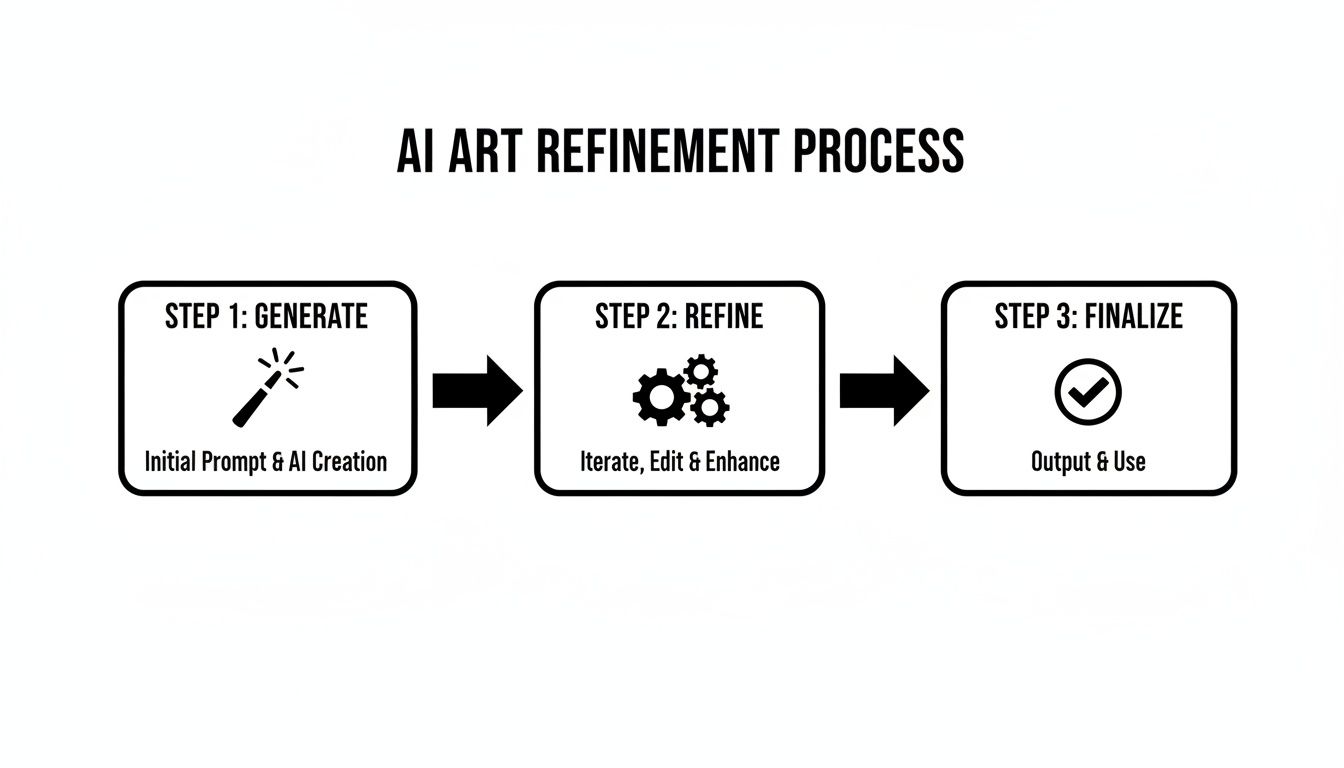
This workflow—Generate, Refine, and Finalize—is the secret sauce. Generating gets your ideas flowing, refining is where you sweat the details, and finalizing is all about getting it polished and ready for your audience. Trust me, embracing this iterative process will save you a ton of time in the long run.
This isn't just a fun new toy; generative AI is completely changing the design game. The market is projected to hit an eye-watering USD 16.9 billion by 2035. What's really cool is that small businesses and solo creators can now punch way above their weight class. We're seeing campaigns using AI-generated visuals boost their conversions by as much as 30%.
AI’s muscle extends far beyond just creating abstract art. It's a powerhouse for e-commerce, capable of generating incredible visuals for your products. If you’re selling online, you absolutely need to check out what’s possible with AI product photography.
And why stop at static images? You can use SendFame’s image-to-video feature to turn your best creations into short, looping videos. It's a fantastic way to add a bit of motion to your social feeds and keep people engaged for longer.
"These targeted AI workflows can save hours of creative time and deliver standout visuals at scale.”
Feel free to steal these playbooks and adapt them to whatever you're working on. Mix up the prompts, experiment with different tools, and play around with post-production. With just a few tweaks, you’ll be creating unique assets that truly reflect your brand and personality.
Once you’ve got your amazing AI art, don’t just let it sit there! Weave it into your email newsletters and ad campaigns by exporting the assets in web-friendly formats. I like to slice up a single great image into carousels, stories, and banners to get the most mileage out of it.
Run some A/B tests. Pit your AI visuals against your old designs and see what performs better. Watch your metrics. Keep an eye on things like click-through rates and time on page to figure out what’s resonating. Keep it fresh. I recommend rotating your creative every two weeks or so to avoid ad fatigue.
By keeping an eye on the results, you can quickly learn what works and fine-tune your prompts and layouts for even better performance next time.
Ready to level up? Start pairing your AI art with custom soundtracks or voiceovers. A tool like SendFame has an AI Music Generator and celebrity video features that can turn a simple visual into a full-blown experience.
Try layering a subtle, ambient track behind a gallery of your AI art to create an immersive Instagram Reel. Combine a celebrity-style video clip with a behind-the-scenes look at how you generated the art for a super engaging story.
When you start integrating visuals, audio, and dynamic editing, these AI workflows become an absolute creative powerhouse. So what are you waiting for? Start experimenting and watch your content shine.
As you dive into the wild world of AI art, you're bound to have a few questions pop up. It happens to everyone. We’ve rounded up some of the most common head-scratchers we hear from creators who are just starting out. Let's clear the air so you can get back to making cool stuff.
Let's just get this one out of the way. It’s the big, philosophical question on everyone’s mind, and the answer is a resounding yes.
Art has always been tied to technology. Think about the invention of the camera, or when digital painting first came on the scene. Each time, people questioned if it was "real art." AI is just the latest chapter in that story.
You aren't just pushing a button and hoping for the best. You're the director here. You're dreaming up the concept, painstakingly crafting the prompt, sifting through the results to find the perfect one, and then tweaking it until it's just right. The AI is your collaborator—a ridiculously fast and talented one—but you're the artist calling the shots.
The magic isn't in the algorithm. It's in the human mind guiding it. Your vision, your taste, and your weird little ideas are what turn a bunch of text into something that makes people stop and stare.
Okay, this is where things get a little fuzzy, as the law is still scrambling to keep up with the tech. For the most part, you’re in the clear to use images you create for personal projects or your social media feed. But when money and copyright enter the picture, you need to pay attention.
The U.S. Copyright Office has basically said that a piece created entirely by AI with no human intervention can't be copyrighted. However, the more you’re involved—through detailed prompting, curating, and post-processing—the stronger your claim to authorship becomes.
A few ground rules to keep in mind:
Going Commercial? Read the Fine Print: Always, always check the terms of service of the AI tool you're using. Many platforms, like Midjourney or the paid tiers of other services, explicitly give you the commercial rights to whatever you generate.The Public Domain Factor: A lot of AI-generated art is essentially treated as public domain. That means you can use it, but so can everyone else. You can't stop someone from grabbing an image you posted and using it themselves.When in Doubt, Disclose: If you're using AI art professionally, just be upfront about it. A simple disclosure can save you a lot of headaches down the road. It's just good practice.
This is the fear that looms over every conversation about AI, isn't it? But here’s the reality: AI isn't replacing artists. It's giving them a new set of superpowers.
Think back to when synthesizers first appeared. Did they replace musicians? Nope. They just opened up a whole new universe of sound. AI is doing the same for visual art.
Artists are now using these tools to brainstorm at lightning speed, mock up concepts in minutes, and explore styles that would've taken a week to paint by hand. It's a muse, an assistant, and a creative partner all rolled into one. The pros who embrace AI are finding they can create more, iterate faster, and focus their energy on big-picture creativity instead of tedious grunt work.
Ah, yes. The dreaded "AI Look"—that glossy, soulless, plastic-y vibe. It’s a real thing, and it usually happens when your prompts are too simple. "A dragon," for example, is going to give you a very generic dragon. The secret to making something unique is to get weird and specific.
Here’s a quick cheat sheet for breaking out of the generic box:
| The Problem | The Fix |
|---|---|
| "It looks like every other AI image." | Get hyper-specific with your style. Don't just say "sci-fi." Try "in the grainy, lo-fi style of a 1980s Japanese sci-fi anime VHS cover." |
| "The hands and faces are freaking me out." | Use a tool's inpainting feature to repaint just that tiny, messed-up area. Or, pull the image into a basic photo editor for a quick fix. It often takes just a few seconds. |
| "The composition is so boring." | Direct the camera! Add phrases like "dramatic low-angle shot," "cinematic wide shot," or "extreme close-up" to give your image some directorial flair. |
The more of your own personality you cram into the prompt, the less it will look like it came off an assembly line. Mash up unexpected styles, describe a bizarre mood, and demand specific lighting. Make the AI work for your vision, not the other way around.
Ready to move from theory to practice? With SendFame, you can jump straight into the fun part. We give you the tools to create stunning visuals, personalized celebrity videos, and even custom music—all designed to be fast, easy, and ridiculously powerful. Stop wondering and start creating. Bring your wildest ideas to life with SendFame today!
Create Epic

SendFame

Create Epic with SendFame!
Questions: info@sendfame.com