How to Produce Rap Beats That Sound Professional
how to produce rap beats
Welcome offer — 56% OFF


Learn how to make song with ai from idea to finished track, with tips on lyrics, vocals, and mastering using top AI tools.
So, you want to make a song with AI? It's actually way easier than you think. With a tool like SendFame, you can go from a simple text idea to a full-blown track in a matter of minutes. We're talking lyrics, melody, vocals, the whole shebang. You can even whip up some slick album art and a music video to go with it, all powered by the same AI magic. It's like having an entire creative studio in your browser, no experience necessary.
Welcome to the future of making music, where you're the creative genius and AI is your tireless studio engineer. Not too long ago, trying to produce a professional-sounding song meant shelling out for expensive gear, spending years learning an instrument, and maybe getting a little lucky. Now? That whole marathon has been compressed into a few clicks. This isn't just some small tech update; it's a creative earthquake that puts a fully-equipped recording studio right at your fingertips.
This isn't just a fleeting trend, either. The generative AI music scene is absolutely exploding, pulling in USD 569.7 million and rocketing towards a projected USD 2,794.7 million by 2030. That’s not a typo. The market is growing at a blistering 30.5% compound annual rate, which tells you just how many creators are jumping off the old-school production treadmill and onto the express train of instant, custom-made music. You can dig into the numbers yourself over at Grandview Research.
Platforms like SendFame are leading the charge, making the whole process feel natural and ridiculously quick. Forget getting tangled up in music theory or staring blankly at complicated software. Here, you get to stay focused on the fun part: your creative vision. The entire workflow is broken down into a few simple, logical stages.
This little diagram pretty much sums it up—it's a straight shot from a spark of an idea to a finished song.
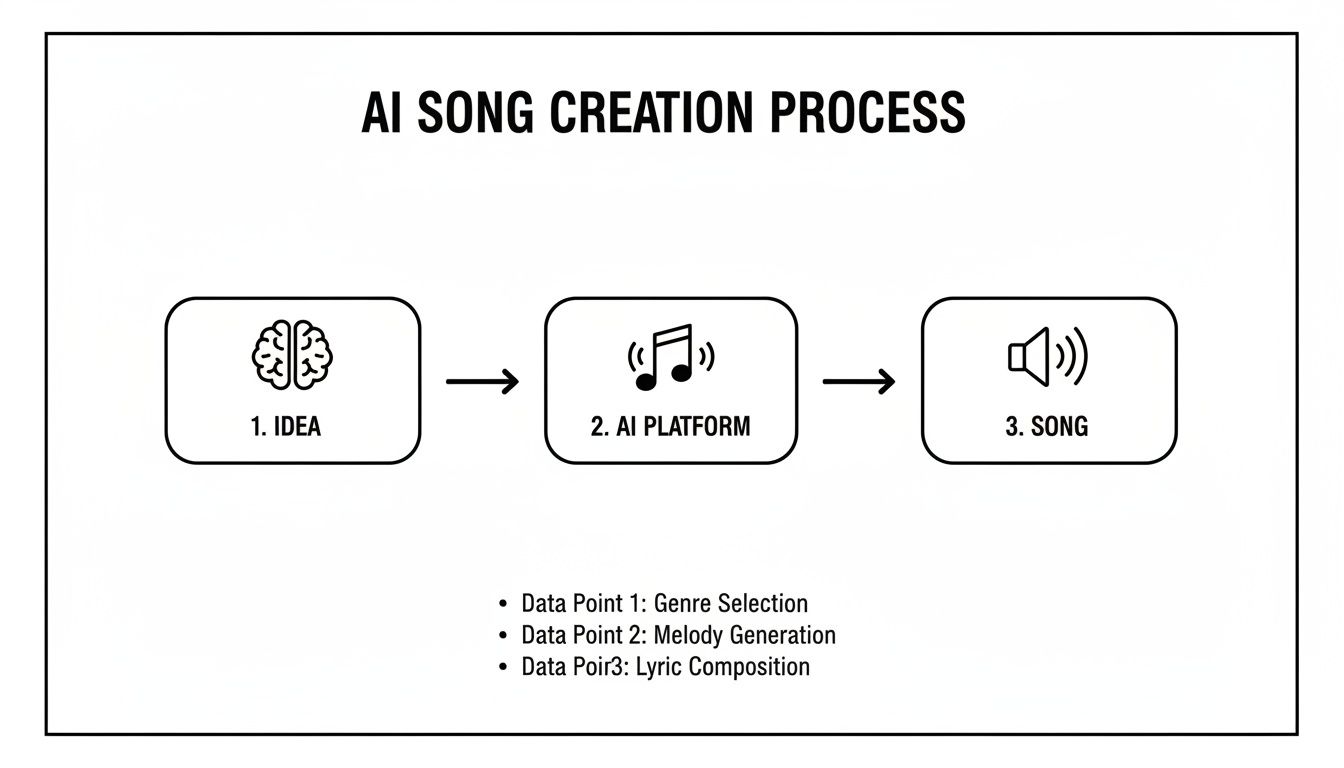
See? Your idea goes in one end, the AI does its thing, and a ready-to-play track comes out the other. Simple as that.
Because these tools are so easy to use, they've blown the doors wide open for a ton of people who never would have considered making music before. This isn't a "professionals only" club anymore. The new wave of AI artists includes folks like:
Social Media Influencers who need a constant supply of unique, royalty-free music for their videos. Small Business Owners trying to cook up a catchy jingle or a brand anthem for their next marketing push. Aspiring Musicians who can now rapidly sketch out song ideas without having to book a single minute of studio time. Digital Marketers who need to produce audio for an ad that perfectly captures the mood of a campaign.
The real magic here is the combination of speed and total control. You’re not just finding a song that kind of works; you’re creating the exact song you need, right when you need it. That on-demand power is what makes this a total game-changer for anyone creating content. If you want to dive deeper, you can learn more about what AI music is in our detailed guide.
Let's be real. Diving into an AI music tool without a game plan is like trying to bake a cake by just throwing random ingredients into a bowl. You might get something, but it probably won't be the masterpiece you were hoping for. The magic happens before you ever touch that "generate" button. This is your pre-production phase, the moment you decide what this song is actually about.
Think of yourself as the director of a movie, setting the scene. What's the feeling you're chasing? Is it a high-energy, synth-pop banger destined to be the next big TikTok sound? Or are you aiming for a moody, lo-fi hip-hop track that's perfect for a rainy day and a cup of coffee? Specificity is your best friend here.
The biggest rookie mistake when you make a song with AI? Being vague. "Happy song" is a creative dead end. "An upbeat, feel-good indie pop song with jangly guitars and a simple, catchy chorus about the first day of summer vacation"? Now that's a blueprint the AI can actually build from.
First things first, let's get the foundation right. Your genre and mood are the cornerstones of the entire track. And don't feel like you have to stick to just one! Some of the most interesting music comes from blending influences.
Here are a few ways this plays out in the real world:
Creating a Brand Anthem: You're not just making "corporate music." You're crafting an "epic, inspiring orchestral score with powerful drums and uplifting strings" to make your new product feel like a Hollywood blockbuster. Hooking Podcast Listeners: You need more than a generic intro. How about a "quirky, retro synthwave jingle with a catchy, 8-bit melody" that's instantly recognizable? Scoring a Personal Film Project: You have a dramatic scene that needs a punch. A "dark, gritty blues-rock track with a distorted slide guitar and a raspy, soulful male vocal" will give it the weight it deserves.
See the difference? This isn't just about picking a genre; it's about painting a picture with words. The more detailed your vision, the less time you'll spend hitting regenerate and hoping for the best.
With a solid vibe in mind, you can start thinking about lyrics and translating it all into a prompt the AI will understand. You can absolutely write the lyrics yourself, but AI tools can be incredible for busting through writer's block. The trick is to feed the AI the same emotional cues you've already defined. If you're stuck, a song ideas generator can be a goldmine for sparking a unique concept.
This quick table shows how to turn a basic idea into a killer prompt.
| Song Goal | Genre & Mood | Key Elements for Prompt | Example AI Prompt |
|---|---|---|---|
| A TikTok Dance Hit | Upbeat Pop / Electronic | High energy, catchy synth hook, simple lyrics, strong beat, 128 BPM | "Create a high-energy synth-pop track at 128 BPM with a bouncy bassline and a simple, infectious synth melody. Female vocals, lyrics about dancing all night." |
| A Relaxing Study Beat | Lo-Fi Hip Hop / Chillhop | Mellow, jazzy chords, soft drum loop, vinyl crackle, no vocals, 75 BPM | "Generate a chill lo-fi hip hop beat at 75 BPM. Feature jazzy piano chords, a dusty drum sample, and subtle vinyl crackle for a warm, relaxing vibe." |
| An Emotional Ballad | Indie Folk / Singer-Songwriter | Acoustic, melancholic, intimate vocals, slow tempo, storytelling lyrics, 65 BPM | "A slow, melancholic indie folk song at 65 BPM. Lead with a fingerpicked acoustic guitar and a gentle, breathy male vocal. Lyrics about nostalgia and lost love." |
| A High-Octane Workout Jam | Hard Rock / Metal | Aggressive, fast-paced, distorted guitars, powerful drums, energetic vocals, 150 BPM | "Make a fast-paced hard rock track at 150 BPM. Driving, distorted guitar riff, thunderous drums, and a powerful, anthemic male vocal shouting about overcoming challenges." |
This isn't about letting the AI do all the work; it's a partnership. You provide the creative direction—the mood, the story, the style—and the AI becomes the instrument to bring that vision to life. A strong brief is the difference between a random generation and a song that feels truly yours.
Alright, you've got your creative blueprint. Now for the fun part. This is where your ideas, lyrics, and late-night musings get turned into actual, listenable music. When you're using a tool like SendFame, you're less of a button-pusher and more of a director. Think of yourself as guiding a super-talented (and ridiculously fast) musician who’s ready to play whatever you can dream up.
The whole thing hinges on your prompt. Seriously. It’s your sheet music, your production notes, and your artist's mood board all rolled into one. A vague prompt will get you a bland, forgettable track. But a detailed, vivid prompt? That’s how you make a song with AI that sounds like it was pulled straight out of your head.
Getting your prompt right is more art than science. It's a delicate dance between technical details and creative flair. You need to feed the AI enough specifics to build the song's skeleton, but also give it enough emotional context to give the track a soul.
So, what goes into a prompt that actually works? Let’s break it down.
Genre and Mood: Get specific! "Pop song" is lazy. Try "80s-inspired synth-pop with a nostalgic, bittersweet feeling." See the difference? Tempo (BPM): This is non-negotiable. "Fast" means nothing to a machine, but 140 BPM is a crystal-clear command. Instrumentation: Name your weapons. "A driving bassline, shimmering synths, and a classic drum machine beat" paints a picture the AI can actually work with. Vocal Style: This is where you can really have some fun. Don't just settle for "female vocal." Describe the character of the voice. Is it a "breathy, ethereal female pop vocal" or a "powerful, soulful female rock vocal"?
Let me show you how a small change makes a massive difference. A prompt for a "sad song with piano" is a total shot in the dark. But what about a prompt for a "slow, melancholic piano ballad at 60 BPM with a soft, intimate male baritone vocal, reminiscent of Hozier"? Now you’ve given the AI a rich, detailed scene to work with. The results will be night and day.
My secret? I layer descriptions. I'll combine a genre, an emotion, an instrument, and a vocal texture all in one go. The more layers you give it, the more unique and yours the final song will feel.
One of the coolest things about modern AI music tools is playing with vocal personas. We're way beyond just "male" or "female" now. Platforms like SendFame let you experiment with voices that feel like they belong to a certain era or even hint at a famous artist's tone. Ever wanted a track that sounds like it was sung by a 90s grunge god or a K-pop superstar? You can literally just ask for it.
This is an absolute game-changer for so many things—making hilarious parody songs, creating brand jingles that feel instantly familiar, or just giving your original track a personality that makes people sit up and listen. It's like tapping into a cultural cheat code.
And here’s a pro tip: don’t just generate once and call it a day. Your first try might be 90% of the way there, but a tiny tweak to the vocal style or swapping one synth for another could be the magic touch it needs. Start thinking like a producer. Generate a few different takes, then pick and choose the best parts of each one to assemble your masterpiece.
Alright, you’ve coaxed some absolute bangers out of the AI. You've got killer verses, a chorus that's an earworm, and an instrumental that slaps. High five.
But here’s where the real magic happens. It's time to put on your producer hat. A pile of great-sounding clips isn't a song—not yet. Arranging them into something that flows, builds, and tells a story is what separates a neat experiment from a track that gets stuck in people's heads.
Think of yourself as a film director. You have all these amazing scenes, but you need to edit them together to create an emotional journey. A song needs a beginning, a middle, and an end. It needs to build tension, hit a high point, and then bring the listener back down gently. Let’s do this.
Don't worry, you don't have to reinvent the wheel. Most of the songs you love follow a time-tested structure. It's a formula because it works. You can easily generate each of these sections in your AI tool just by tweaking your prompts slightly.
A classic pop song structure often looks something like this:
Intro: A quick hook to set the vibe and grab the listener's ear. Verse 1: This is where you start telling your story. The energy is usually a bit dialed back. Chorus: The main event! This is the big, catchy, memorable part that people will sing along to. Verse 2: Back to the story, maybe from a new angle. Chorus: Hit 'em with that hook again to make sure it sticks. Bridge: Time for a change of scenery. This section switches things up melodically or lyrically to build anticipation for the grand finale. Final Chorus: The last, most powerful delivery of your main idea. Outro: The fade-out, the final chord, the last word. How you say goodbye.
This might look intimidating on paper, but tools like SendFame make it a simple drag-and-drop affair. You're the one calling the shots, deciding when the beat drops and how the story unfolds.
You’re not alone in taking this hands-on approach. A Sonarworks survey revealed that only 20% of producers use AI to generate entire songs from scratch. Most are using it just like this—as a powerful assistant for specific tasks. They remain the creative directors, guiding the tech. You can see the full breakdown in DynamoI’s report.
Once you’ve got the structure locked in, it's time to add the finishing touches that make your track sound pro. No, you don't need a degree in audio engineering. The best tool you have is right between your ears.
Listen to the whole song from start to finish. Then do it again.
Do the transitions feel jarring or smooth? Is the vocal getting drowned out by the drums during the chorus? Sometimes, just nudging a volume fader up or down is all it takes to make a section pop. Most AI platforms have basic mixing controls built right in, so you can tweak levels without ever leaving the app. The goal is simple: make sure every part can be heard clearly and nothing is fighting for attention.
This is the step that turns your collection of cool AI loops into a cohesive, polished piece of music. If you want to explore more powerful tools to help with this stage, check out our guide on the best AI tools for music production.
Alright, you've done it. The track is finished, the mix is tight, and it sounds absolutely fantastic. But let's be real—in a world where we're swimming in new content every second, a killer song needs an equally killer visual to cut through the noise. A great tune with a lazy visual is like a gourmet meal served on a paper plate; it just kills the vibe.
This is where having an all-in-one tool like SendFame really pays off. You don't need a degree in graphic design or years of video editing experience to wrap your masterpiece in a professional-looking package. It’s time to give your music some visuals.
Think of your album art as your song's first impression. It's the handshake, the outfit, the thing that makes someone stop scrolling and actually listen. In a single image, you need to bottle up the entire mood of your track.
Using the built-in AI image generator is a blast, and it works just like making the music: it all hinges on your prompt. Really think about the feeling of your song. What colors, textures, and scenes does it bring to mind?
Got an upbeat synth-pop banger? Try something like, "Vibrant, neon-drenched retro-futuristic cityscape at night, 80s synthwave aesthetic, glowing geometric shapes, photorealistic." Wrote a moody indie folk ballad? How about, "A lone acoustic guitar leaning against a misty forest tree at dawn, soft morning light, muted colors, oil painting style." Crafted a face-melting rock anthem? Go for something bold like, "Abstract explosion of fiery red and black ink, chaotic energy, high contrast, gritty texture, digital art."
Don't settle for the first thing the AI spits out. Go wild! Generate a dozen different versions. Play with styles, from abstract and painterly to hyper-realistic, until one image just clicks. You'll know it when you see it.
Your goal here is to create a visual hook. Just like the chorus of your song needs to be catchy, your album art needs to be unforgettable. It’s the visual signature that makes your track instantly recognizable in a crowded playlist.
Okay, a stunning static image is fantastic, but let's be honest: video runs the world now. To really make a splash on social media, you need motion. You can take that gorgeous album art you just made—or any image, really—and turn it into a hypnotic music video perfect for TikTok, YouTube Shorts, or Instagram Reels.
Think about the possibilities. Let’s say you’re a small business and you just used AI to whip up a jingle for a new product. Now you can use an AI Music Video Generator to animate your product shots or even your company logo, all perfectly synced to the beat of your new track. Suddenly, you have a pro-level ad campaign without dropping thousands on a video crew.
The AI takes your image and breathes life into it, adding slick effects, smooth transitions, and dynamic motion that pulses right along with your music. This is the final piece of the puzzle. You've turned your song into a full-blown multimedia experience that’s ready to be not just heard, but seen and shared everywhere.
Alright, you did it. You wrestled with prompts, tweaked the arrangement, and now an absolute banger of a song is sitting on your hard drive. So… what’s next? Before you start planning the world tour, we need to talk business.
The world of AI music rights can feel a bit like the Wild West right now, but getting a handle on the rules is what separates a viral sensation from a legal nightmare.
When you make a song with AI using a service like SendFame, you're almost always granted a license for the music you create. This license usually covers commercial use, which is awesome. It means you can use your track in YouTube videos, as a podcast theme, or even in an indie film. But—and this is a big but—the devil is in the details. Always, always, always read the terms of service. Think of it as the official playbook that spells out exactly what you can and can't do.
This is the million-dollar question, isn't it? The legal landscape is still catching up, creating a bit of a gray area. Generally, for a piece of work to get copyright protection, it needs a healthy dose of human authorship. Your creativity is the key here. The prompts you wrote, the arrangement decisions you made, the final mix—all of that builds a strong case for you as the author.
The big idea is this: You were the director. The AI was just a really, really talented instrument. You made the crucial creative calls that brought the song to life, and that distinction is everything when it comes to claiming authorship.
Can you actually earn cash from your AI-powered tune? You bet. The most straightforward paths are often the best place to start.
Become Your Own Soundtrack: Use your custom music as the backdrop for your social media content. A unique score helps your brand pop and completely sidesteps the copyright strikes that come with using popular songs. License It Out: If you cook up something truly special, you could license it to other creators, businesses, or filmmakers for their projects. Release It to the World: You can absolutely upload your track to Spotify or Apple Music. Just be ready for the competition. The digital music scene is currently being flooded with AI-generated tracks.
And I mean flooded. At one point, Deezer's servers were getting hit with over 50,000 new, fully AI-generated tracks every single day. Spotify had to pull down more than 75 million spammy or low-quality songs in a single year, with AI being a major culprit. Your song needs to be more than good; it needs to be exceptional and promoted like crazy to cut through that noise.
Once your track is ready for the world, the business side of things becomes critical. To really get it out there, learning how promotions play a key role in music events can give you a massive leg up. In a world this crowded, a killer song is just the beginning—you need a smart strategy to connect it with an audience.
Jumping into AI music for the first time usually kicks up a dust cloud of questions. It's totally normal. You're probably wondering about who owns the final track, whether it'll sound any good, and how the whole thing actually works. Let's tackle some of the biggest questions I hear all the time so you can get started with confidence.
Ah, the million-dollar question. The short answer is: it’s complicated, but you're generally in the clear.
Most platforms, like SendFame, give you a very broad license to use the music you create, which usually includes permission for commercial use. The legal nitty-gritty around "ownership" is still being hammered out because traditional copyright law requires significant human authorship.
The good news? All your creative work—the detailed prompts you write, the way you arrange the final track, the little tweaks you make—is your human touch. That creative direction is a powerful argument for you being the author.
My advice: Always, always read the specific Terms of Service for any platform you use. That's your ultimate guide. But rest easy knowing your role as the creative director puts you in a strong position.
Absolutely, it can. If you're picturing the robotic, soulless MIDI tunes from a decade ago, you're in for a surprise. Today's AI tools are light-years ahead, and the originality of your song comes down to the quality of your ideas.
The real magic happens when you get specific and weird with it.
Instead of a generic prompt like "make a pop song," try pushing the boundaries:
Mash up unexpected genres. Think "dystopian synthwave meets a gospel choir" or "lo-fi hip-hop with sea shanty rhythms." Call for specific, less-common instruments. How about a kalimba melody or a haunting theremin solo? Feed it deeply personal or unique lyrical themes. The AI can't pull that from a generic database.
The more detailed and imaginative you are, the less it sounds like an algorithm and the more it sounds like your unique vision. Think of the AI as a world-class session musician who can play anything, not just a button to push.
Not a chance. That’s the whole point. For decades, the biggest walls standing between an idea and a finished song were technical skills and a mountain of expensive gear. AI tools were built to tear those walls down.
If you can type a sentence describing a mood or a scene, you have all the technical skill you need to get a full track.
These platforms are designed to be intuitive, walking you from a spark of an idea all the way to a polished song. The learning curve is practically nonexistent, throwing the doors of music creation wide open for everyone.
Ready to stop wondering and start creating? With SendFame, you can cook up a complete song—vocals, artwork, and all—in just a few minutes. Your next hit is waiting at https://sendfame.com. Give it a try
Create Epic

SendFame

Create Epic with SendFame!
Questions: info@sendfame.com