Your Guide to Creating an Artificial Intelligence Rapper Voice

artificial intelligence rapper voice
Welcome offer — 56% OFF


Discover how using AI to create videos transforms your ideas into reality. This guide offers practical, actionable strategies to produce quality content fast.
Think you need a full-blown production studio and a blockbuster budget to create professional-looking videos? Think again. We’re living in an age where turning simple text into a slick, polished video is not just possible—it's something you can do in minutes. This isn't science fiction anymore; it’s a reality thanks to tools like SendFame that put a virtual video crew right at your fingertips.
Welcome to your new creative reality, where an idea you have over your morning coffee can become a shareable video asset before you've even finished the cup. This is a huge shift in how we think about content. It’s breaking down the old barriers of high costs and technical headaches that kept so many great ideas on the shelf.
The market is exploding for a reason. Projections show the global AI video generator market is set to jump from USD 614.8 million in 2024 to an incredible USD 2.56 billion by 2032. Want to dig into the numbers? You can read more about these market projections and see the data for yourself.
What's driving this incredible growth? Two simple things: speed and accessibility. Forget about juggling schedules, renting expensive gear, or getting lost in the weeds of complicated editing software.
The real magic here is the ability to take a script and turn it into a finished video faster than you can make a pot of coffee. That kind of speed is a massive advantage in today's world.
So, what can you actually do with this?
Knock out some killer social media ads. Create a bunch of variations for different platforms without spending all day on it. Whip up professional corporate training videos. Get consistent, high-quality modules done without ever booking a studio. Send personalized video messages. Use an AI avatar to record unique greetings or company-wide announcements.
This is just one piece of the puzzle. To really get a sense of the bigger picture, it's worth understanding how AI is transforming content creation for businesses across the board.
Ready to jump in? Let's walk through exactly how you can start making your own AI-powered videos today.
So, you’re ready to jump into the wild world of AI video. It's an exciting space, but let’s be real—the sheer number of tools out there can be overwhelming. It feels like a new one pops up every week! The trick isn't to find the "best" tool, but the right tool for what you need to accomplish.
Think of it this way: you wouldn't use a sledgehammer to hang a picture frame. In the same vein, a tool that's brilliant for turning blog posts into B-roll-filled social clips isn't the right fit if you need a polished, human-centric presentation. Your goal dictates your gear.
Before you even start looking at features, ask yourself one simple question: What am I actually trying to make?
Are you creating quick, punchy ads for Instagram? Detailed training videos for new hires? Or maybe personalized sales outreach that actually gets opened? Each of these has a completely different set of requirements.
This is where avatar-based platforms like SendFame really come into their own. If you need a consistent "face" for your brand—someone to guide viewers through tutorials or deliver company updates—AI avatars are a game-changer. Imagine shooting an entire video series with the same presenter, in any language, without ever booking a studio or worrying about reshoots. That's the kind of power we're talking about.
My biggest piece of advice? Ignore the flashy marketing hype. Focus squarely on the final product you need to create. Do you need a human presenter, cool animated text, or artsy video clips generated from a text prompt? Figure that out first, and your choices will become crystal clear.
If you're still exploring what's possible, checking out a rundown of the best AI video creation tools is a great way to see the landscape and understand what each type of platform really shines at.
When you start kicking the tires on different platforms, there are a few non-negotiables to look for. The quality of the AI avatars and voices is a big one. Do they look and sound natural, or do they feel a bit robotic? The best platforms even let you clone your own voice for that ultimate personal touch.
Next up, templates. A robust template library is your best friend. It saves you from the horror of the blank page and gives you a professional, well-designed starting point.
Here's a quick checklist of things I always look for:
Your Brand, Your Way: How easy is it to upload your own logos, set custom brand colors, and use your own fonts? The video should look like it came from you, not the AI tool. Built-in Goodies: Does it come with a solid library of stock photos, video clips, and background music? This can save you a ton of time and money. Crystal Clear Output: Can you export in 1080p or even 4K? Low-res video just screams unprofessional, so don't settle for less.
Finally, don't overlook usability. The most powerful tool on earth is worthless if the interface is a nightmare to navigate. The goal is to get from idea to final video with as little friction as possible.
To help you visualize the differences, here's a quick breakdown of the main types of AI video tools and what they're generally good for. There's a lot of overlap, but this gives you a good starting point for figuring out which category best suits your needs.
| Feature | Text-to-Video (e.g., Pictory) | Avatar Platforms (e.g., SendFame) | Advanced AI Editors (e.g., Runway) |
|---|---|---|---|
| Primary Use Case | Turning articles/scripts into B-roll videos | Creating presenter-led videos (training, marketing, sales) | Generating cinematic or artistic clips from text/image prompts |
| Human Element | Low (stock footage, animated text) | High (hyper-realistic AI avatars and custom voices) | Varies (can generate scenes with or without people) |
| Customization | Good for branding, text styles, and media selection | Excellent for avatar, voice, and full scene customization | High-level creative control over generated visuals and effects |
| Ease of Use | Very easy; often fully automated | Easy to moderate; template-driven with intuitive interfaces | Moderate to advanced; requires more creative input and direction |
| Best For | Content repurposing, social media snippets, quick summaries | Corporate communications, e-learning, personalized outreach | Creative projects, concept art, unique marketing campaigns |
Ultimately, the best platform is the one that aligns with your specific video goals and workflow. Whether you need a simple tool for quick content or a sophisticated platform for creating human-led presentations, there’s an AI solution out there that can make your life a whole lot easier.
Alright, this is where the fun really begins. We're about to take that idea swirling around in your head and turn it into a real, shareable video. Let's roll up our sleeves and create a snappy 30-second promo for a hypothetical new product launch.
Every great video, AI or not, starts with a solid script. The golden rule for AI narration? Keep it conversational. Seriously, write like you're talking to a friend. Ditch the jargon and those long, complicated sentences that make you run out of breath. They'll sound just as clunky when an AI voice reads them.
For our imaginary product, "Spark," the script could be as simple as this:
"Tired of boring team updates? Meet Spark, the new way to keep your team in the loop." "Get one-click summaries and track projects in real-time. You’ll never miss a beat." "Ready to see why teams everywhere are switching? Head to our website to learn more!"
See? It's simple, direct, and has a nice rhythm. This punchy style is perfect for using AI to create videos because it gives the AI clear cues on tone and pacing.
With the script locked in, it's time for casting. This is easily one of the coolest parts. You get to choose an AI avatar and a voice that feels right for your brand. Are you going for energetic and friendly? Or maybe more buttoned-up and professional? Platforms like SendFame have a whole lineup of personalities to pick from.
Most tools let you preview different voices reading a line from your script, which is a lifesaver. Listen for a natural flow and a tone that matches the vibe you're after. For our "Spark" promo, we’d definitely want someone who sounds upbeat and confident to build some buzz.
Here's a pro tip: Don't think of the avatar and voice as two separate things. They're a package deal—a single persona that represents your brand. Getting this combo right makes your content feel way more authentic and polished.
Next up is the visual template. These are pre-designed backgrounds and layouts that save you a ridiculous amount of time. Just pick one that fits your brand colors and doesn't steal the spotlight from your message.
This handy little chart shows how your main goal should steer your first few creative decisions.
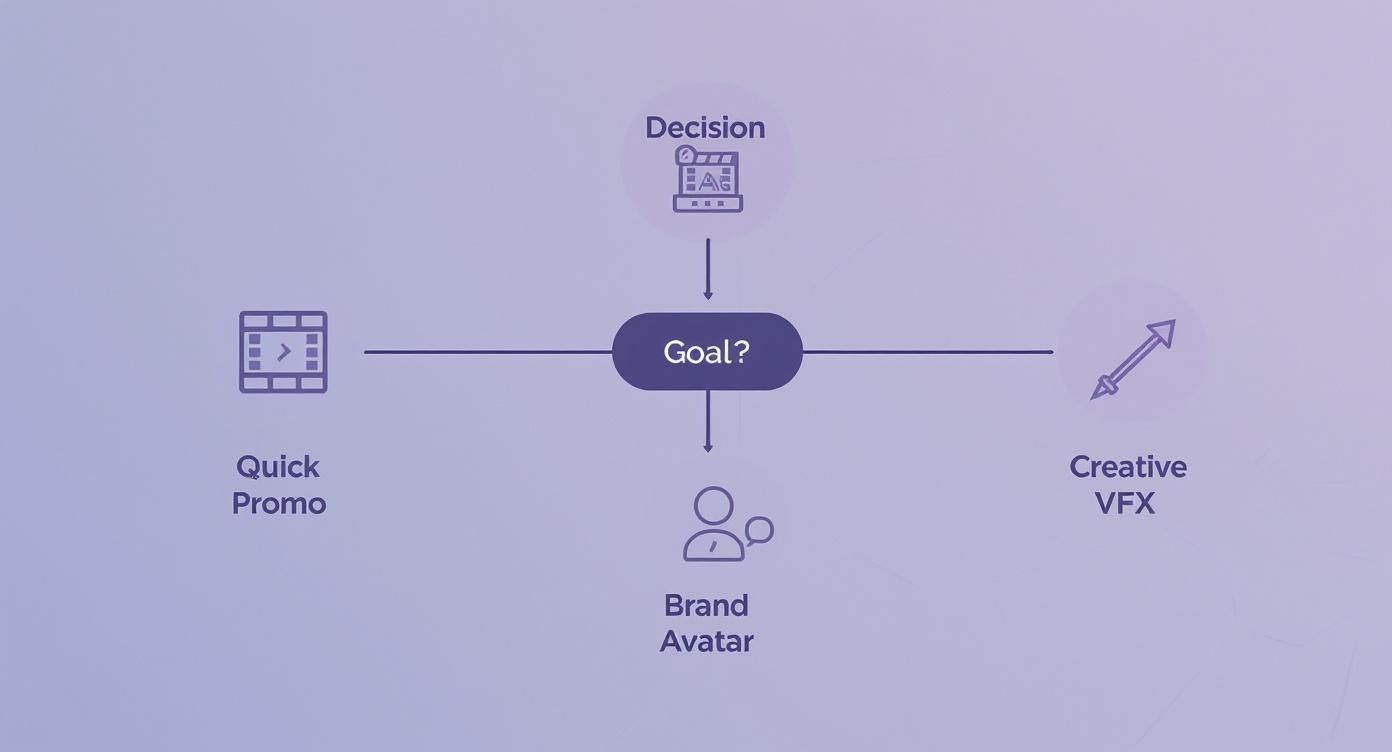
Starting with a clear objective helps you cut through the noise and pick the right assets from the get-go.
From here, it’s as simple as plugging your script into the platform, pairing it with your chosen avatar, and hitting the "generate" button. This whole process is an absolute game-changer for anyone who needs to pump out content quickly. We're talking about making dozens of videos a day—something that was pure fantasy with traditional video production.
You'll have a complete first draft in less time than it takes to make a pot of coffee. This incredible speed means you can experiment, tweak, and test different versions without blowing your entire day. If you want to dive deeper, you can learn more about how to generate a video with AI in our full guide.
Alright, the AI has done its part. You’ve got a solid first draft with the script, avatar, and basic flow all stitched together. Now for the fun part—this is where your human creativity comes in to take that good AI output and make it great.
Think of yourself as the director stepping in for the final cut. This isn't about making massive changes; it’s about those little tweaks, the subtle polish that injects your personality and makes the video undeniably yours.
A video shouldn't just carry your message; it needs to feel like it's from you. The quickest win here is to bake your brand's look and feel right into the visuals. It's how you put your signature on the final product.
Here's the low-hanging fruit:
Pop Your Logo On: Find a cozy corner for your logo. A subtle, constant watermark keeps your brand visible without hogging the spotlight. Dial in Your Colors: Ditch the generic template colors and punch in your brand's specific hex codes. That consistency is gold for brand recognition. Use Your Font: If the platform lets you, upload your own brand font. Keeping the text consistent with your website and other marketing stuff creates a super professional, cohesive vibe.
These small moves are like dressing your video in your company's uniform. It instantly looks more professional and trustworthy.
This is the step that separates a generic, forgettable clip from a true branded asset. The AI lays the foundation, but your creative fingerprint is what actually connects with people.
With the branding locked down, let's make the video more engaging. The right background music and a few visual flourishes can totally transform the mood and make your message stick. After all, people are 82% more likely to remember a message from a video than from text alone.
Music is a great place to start. A peppy, upbeat track can inject excitement into a product launch. A chill, ambient tune makes a tutorial feel more relaxed and easy to follow. Most AI tools, including SendFame, come with a library of royalty-free music, so you can just drag, drop, and you're good to go.
Next up, sprinkle in some of your own footage. The AI-generated scenes are a great start, but cutting to a quick clip of your product being used or a shot of your team instantly adds a dose of real-world authenticity. This is what we call B-roll footage, and it's perfect for breaking up the visual flow and showing, not just telling.
Finally, use text overlays to hammer home key takeaways or flash a clear call-to-action. These are like little signposts that direct your viewer’s eyes exactly where you want them. While many AI tools have these features, if you find yourself wanting more control over the fine details, our video editing software comparison is a great resource for finding a more advanced tool. It's all about layering these elements to create something dynamic and memorable.
Alright, you've created your video masterpiece. High-five! But don't pop the champagne just yet. The best video in the world is useless if no one sees it. Now comes the fun part: getting your hard work in front of the right people.
First thing's first: format matters. A lot. Every social media platform has its own personality, and that includes its preferred video shape. That beautiful widescreen 16:9 video you made for YouTube? It's going to look terrible on Instagram Stories, which is all about vertical 9:16 content. Take a few extra minutes to export a version specifically for each channel. It's a small tweak that makes you look like a pro.
Once your formats are sorted, it’s time to play detective. You need to think like your audience and figure out what words they're typing into search bars. Sprinkle these keywords into your video's title, description, and tags. This isn't just busywork; it's how you get discovered.
This is especially true for businesses, which make up a whopping 70.1% of the AI video market right now. Companies are jumping on these tools for everything from marketing campaigns to internal training. To make sure your videos hit the mark, you'll want to build a winning social media marketing strategy that puts your content on the right screens.
A brilliant video nobody sees is just a creative exercise. A solid distribution strategy turns your AI-generated content into a powerful business asset that drives real results.
At the end of the day, a smart distribution plan is the backbone of any good small business video marketing effort.
Diving into any new tech always comes with a few "what ifs" and "how does that work?" moments. Let's clear up some of the most common questions I hear about creating videos with AI so you can get rolling.
You'd be surprised. We've come a long, long way from those clunky, robotic avatars that sounded like they were reading a phone book.
The best platforms today create presenters that are seriously lifelike. With features like voice cloning and granular controls over tone and pacing, you can craft a video that feels authentic and is often hard to tell apart from a real person on camera. It really comes down to choosing a tool that's obsessed with realism.
It boils down to three huge factors: speed, cost, and scale.
Think about a traditional video shoot. You're looking at weeks of planning, filming, and editing, not to mention a budget that can make your eyes water. With a solid AI tool, you can knock out a polished, professional video in minutes for a tiny fraction of the cost. This means you can finally produce content at the speed of your ideas, testing campaigns and jumping on trends while they're still hot.
The magic here isn't just about making one video for less money. It's about being able to massively scale up your video efforts without needing a massive budget to match.
For the most part, absolutely. Any platform worth its salt will give you full commercial rights to the videos you generate and download.
This means you’re free to use them on your website, in your marketing funnels, across social media—wherever you need them—without getting tangled up in weird licensing problems. That said, it's always a good habit to give the platform's terms of service a quick scan, just to be safe.
Ready to see it in action? With SendFame, you can go from idea to a finished, professional AI video in just a few clicks. Give it a try!
Create Epic

SendFame

Create Epic with SendFame!
Questions: info@sendfame.com