How to Make a Diss Track That Actually Goes Viral
how to make a diss track
Welcome offer — 56% OFF


Learn how to animate still photos for insane social media engagement. This guide covers AI tools, parallax effects, and cinemagraphs to make your content pop.
Ever see a photo online that seems to breathe with life and wonder, "How on earth did they do that?" You're in the right place. We're about to dive into the surprisingly simple art of photo animation, turning your forgotten camera roll into dynamic, engaging content that stops thumbs dead in their tracks.
Forget those cheesy, clunky zooms from old slideshows. I’m talking about professional-grade motion that can seriously level up your social media game. This guide will walk you through five killer methods, from dead-simple tricks to mind-bending AI animation, so you can find the perfect fit for your next project.
In a feed that's screaming for attention, movement is what makes people pause. Animated images cleverly blend the artistry of a great photograph with the stopping power of video. It's a simple trick that instantly makes your content feel more alive, polished, and professional.
For example, figuring out how to make Instagram videos with pictures isn't just a fun party trick; it can seriously boost your engagement by making your feed more dynamic and interactive. It’s a secret weapon for anyone looking to make a bigger impact without a massive video production budget.
The industry is catching on, too. The market for AI tools that handle this stuff is absolutely exploding. The global AI video generator market was valued at a cool $0.6 billion in 2023 and is on track to hit a staggering $9.3 billion by 2033. People want this.
But the real magic is in the storytelling. A gentle zoom can build suspense. A subtle parallax effect can immerse your viewer in a landscape. It’s all about adding emotion and narrative to a single, frozen moment.
Ultimately, animating your photos gives your content a much longer shelf life and a way better chance of getting shared. Ready to make your own scroll-stoppers? You can find even more strategies in our deep dive on https://sendfame.com/blog/how-to-create-viral-content.
Not sure where to start? This little cheat sheet breaks down the five methods we'll cover. Think of it as your menu for choosing the right flavor of animation for your project.
| Technique | Best For | Effort Level | Cool Factor |
|---|---|---|---|
| Simple Motion | Quick, clean social media posts & ads | Low | ★★★☆☆ |
| Parallax (2.5D) | Landscapes, portraits, product shots | Medium | ★★★★☆ |
| Cinemagraphs | Creating a hypnotic, looping effect | Medium | ★★★★★ |
| Frame-by-Frame | Hand-drawn, artistic, and unique animations | High | ★★★★★ |
| AI Image-to-Video | Surreal, magical, or impossible motion | Low | ★★★★★ |
Each technique has its own strengths, from the classic elegance of a simple Ken Burns effect to the mind-bending creativity of AI. Let's get into the nitty-gritty of how to pull them off.
Let's kick things off with an absolute classic that never fails to add a touch of class: the simple motion or "Ken Burns" effect. You’ve seen this everywhere, from high-end documentaries to your favorite YouTuber’s B-roll. It's the art of telling a story with subtle movement.
By slowly panning across a breathtaking landscape or gently zooming in on a subject's face, you’re not just moving a picture around; you're directing the viewer's gaze. This simple trick breathes life and emotion into a static scene, turning a flat photo into a mini-narrative. Honestly, it's one of the easiest and most effective ways to start animating still photos.
The secret sauce behind this whole illusion is the keyframe. Think of keyframes like pins on a map, telling your image where to start its journey and where to end it. You set one keyframe at the beginning (say, a wide shot of a mountain range) and another at the end (maybe zoomed in on a single, dramatic peak).
The software then beautifully fills in all the movement between those two points, creating a fluid, professional-looking pan or zoom. Just about every video editor out there, from iMovie to Adobe Premiere Pro, handles keyframes.
Even better, tools like SendFame often bake this into handy presets. You can just pick a "zoom in" or "pan right" effect, and the platform does all the heavy lifting with keyframes for you. This saves a ton of time and guarantees a buttery-smooth result without any manual guesswork. You can learn more about how simple camera movements like the Dolly Effect can transform your visuals over on our blog.
Pro Tip: Always, always use high-resolution photos for this. When you zoom in, you're basically just cropping the image live. Starting with a big 4K photo gives you incredible flexibility to move around without the final video looking blurry or pixelated.
The magic here really lies in its subtlety. A slow, deliberate pan can create a feeling of discovery, almost as if the viewer is exploring the scene for themselves. A gradual zoom can build tension or pull focus to a crucial detail, like a tiny, telling expression on someone's face.
This method is a workhorse, perfect for all sorts of content:
Social Media Ads: Instantly grab attention by adding a little life to your product shots. Introductory Sequences: It’s a great way to set the scene or introduce a new topic in a video. Photo Montages: Elevate a slideshow from a boring click-through to an engaging, flowing story.
The key is to be intentional. Don't just add random movement for the sake of it. Before you start, ask yourself: what do I want the viewer to feel or notice? Then, design your motion to guide them right there.
If you really want to level up, you can incorporate video and animation in carousels on platforms like Instagram. It transforms a simple post into a much more dynamic, interactive experience.
Alright, let's get into a technique that makes people stop scrolling and ask, "Whoa, how did they do that?" I'm talking about the parallax effect, often called 2.5D animation. This is your secret weapon for turning a flat, boring photo into a mesmerizing scene with a genuine sense of depth. It's an illusion, but a damn good one.
The whole concept is brilliantly simple. You just make things in the background move slower than the stuff in the foreground. It perfectly mimics how our eyes perceive the world. Think about looking out a car window: the trees right next to the road fly by, but the mountains way off in the distance barely seem to budge. We're just recreating that feeling digitally.
To pull this off, you'll need to roll up your sleeves and play digital surgeon. The first step is to carefully slice up your photo into distinct layers. For most shots, a classic three-layer split works wonders:
Foreground: This is your hero—the main subject or whatever is closest to the viewer. Mid-ground: The elements sitting between your subject and the far-off background. Background: The sky, a distant cityscape, or anything way back in the scene.
You can do this in any photo editor that has good selection tools. Photoshop is the industry standard, but a free powerhouse like GIMP works great, too. Tools like "Object Selection" or the "Magic Wand" are going to be your best friends for this job.
Once you’ve isolated each piece, you'll save it as its own PNG file, making sure it has a transparent background. This separation is the key; it's what lets you move each layer independently.
The real magic of parallax isn't just the movement itself. It’s how the different speeds of each layer trick the brain into perceiving depth that isn't really there. You're building an optical illusion that transforms a static image into a living, breathing scene.
After all that cutting and pasting, you bring your layered PNGs into your video editor. You'll stack them up in the right order—background at the bottom, foreground on the very top—and start adding that subtle motion. Maybe the clouds drift lazily to the right while the mountains inch along in the same direction, and the person in the foreground doesn't move at all.
This fundamental process, from a static image to a moving one, is at the heart of most photo animation.
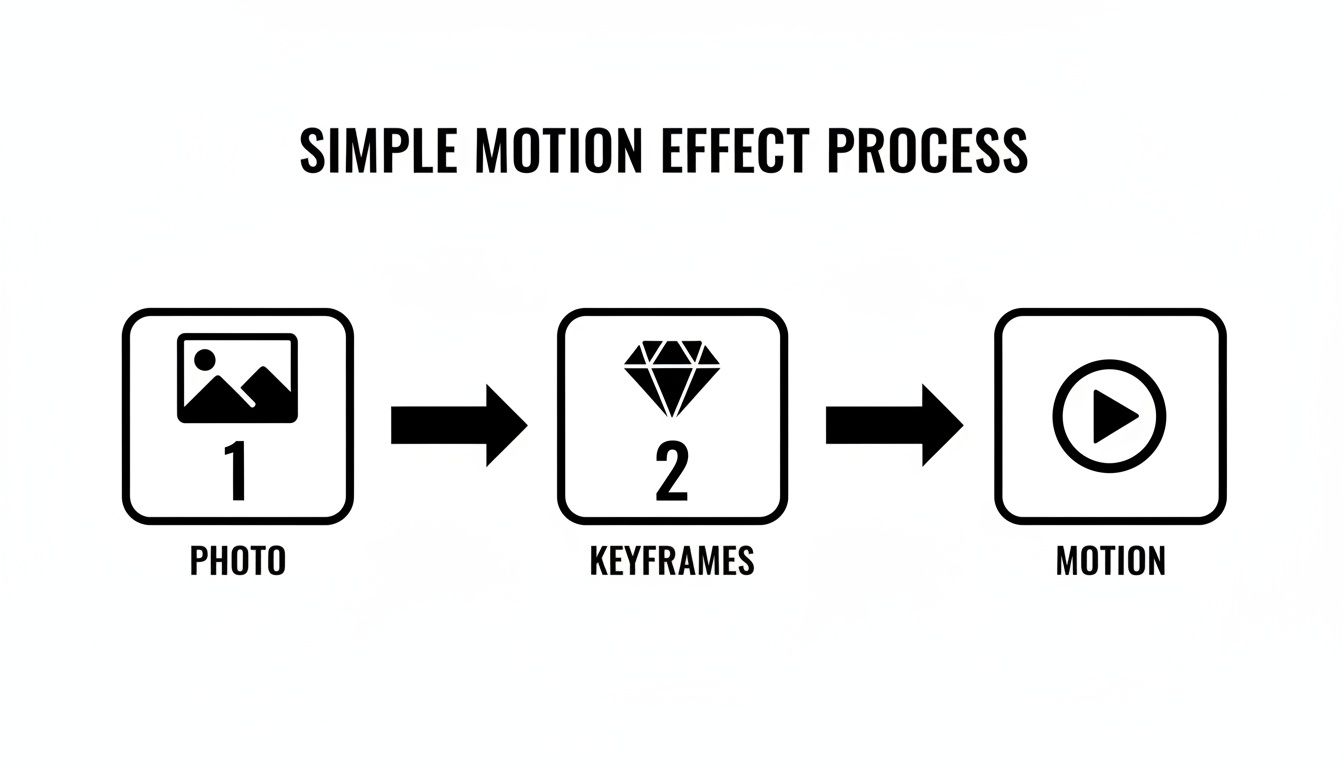
Even with a complex parallax effect involving a dozen layers, you're still just setting start and end points for movement, just like in this simple diagram.
Let’s walk through a real-world example. Say you have a great photo of a friend standing in a forest with a dramatic, cloudy sky.
First, you’d meticulously cut out your friend. That's your foreground layer. Next, you might grab a few rows of trees to create one or two mid-ground layers. Finally, the sky is left as the background. Easy enough.
Now, in your video editor, you’d make the sky layer drift slowly to the left. The trees in the mid-ground would also move left, but just a little bit faster. Your friend in the foreground? They stay perfectly still. Suddenly, you've created this powerful illusion that the camera is smoothly gliding past them.
Yes, this takes more elbow grease than a simple Ken Burns zoom, but the jaw-dropping result is a guaranteed way to make your content pop. If you're looking for a quicker way to get dynamic results, you can also explore our guide on how to turn an image into a video using AI.
Alright, let's talk about the fun part—where the robots do all the tedious work and you get all the credit. AI image-to-video tools are no longer science fiction; they're here, and they're completely flipping the script on how we create motion content. This is the ultimate shortcut to making your static photos feel alive and dynamic, without needing an entire animation studio on standby.
Forget the days of painstakingly setting keyframes or meticulously cutting out layers in Photoshop. The new workflow is almost laughably simple.
You just upload a photo to a platform like SendFame, pick a motion style that catches your eye, and let the artificial intelligence take the wheel. In a matter of seconds, it analyzes your image, figures out what's in the foreground and what's in the background, and generates surprisingly fluid motion.
The real knockout punch here is the raw speed and efficiency. Imagine you’re running social media for a small e-commerce brand. You've got a fantastic new product shot, but let's be honest, a static image just doesn't grab eyeballs like it used to. With an AI tool, you can pop that photo in and instantly get a short video where the product gently drifts or the background subtly warps. Boom. Instant ad campaign.
This isn't just a neat trick; it's a massive market. The demand for animating still photos is a huge driver in the generative AI video space. That market was valued at a cool $336.1 million globally in 2023 and is projected to explode to nearly $2,298.8 million by 2033. We're talking a 21.2% compound annual growth rate. This stuff is the future.
The most exciting part? AI is making high-end animation accessible to everyone. You no longer need to be a technical guru with a subscription to a dozen expensive software suites to create something that looks polished and professional. It’s finally all about the quality of your idea, not the complexity of the execution.
Here's a look at how simple the front-end can be. You just describe what you want, and the AI handles the rest.
This kind of intuitive setup lets you stay focused on your creative vision instead of getting lost in a maze of technical settings. You can rapidly try out different animation styles and find the perfect vibe for your image without that classic, soul-crushing learning curve.
The creative doors this opens are practically endless. Think way beyond just making a product shot look a little slicker.
Make History Move: Running a history-focused Instagram account? Animate old portraits to make historical figures blink or offer a subtle smile. It's an uncanny, powerful way to help your audience connect with the past. Create Talking Avatars: Got a cool cartoon avatar of yourself? Use AI to make it "talk" and send a truly unique birthday message to a friend. Build Surreal Dreamscapes: Take a wild, surrealist digital painting and turn it into a looping, dreamlike video where impossible objects drift, morph, and flow.
These AI-powered features are just one tool in a growing creative arsenal. If you want to dive deeper down the rabbit hole, check out our guide on other fantastic AI tools for video creation that can seriously level up your workflow. At the end of the day, AI animation is your fast pass to creating professional-grade motion that stops the scroll and tells a story, all with just a few clicks.
Ever seen an image that just pulls you in? Where everything is perfectly still, except for one tiny, looping detail? That’s the magic of a cinemagraph—the artsy, sophisticated cousin of the everyday GIF.
Think of steam endlessly curling from a coffee cup while the rest of the cafe is frozen in time. It’s a living photograph, and it’s almost impossible to look away from.

This elegant technique walks the line between photo and video, creating a piece of art that feels both subtle and completely captivating. The trick is that you don't actually start with a photo. You start with a short video clip, and from there, you essentially "paint over" the parts of the scene you want to lock in place.
The real art of the cinemagraph lies in creating a loop so buttery smooth that the viewer can't spot where it begins or ends. This is what separates a professional-grade animation from a clunky, jarring GIF. And it all starts with your source footage.
To get it right, you'll need to:
Use a Tripod: Seriously, this is non-negotiable. The camera must be absolutely rock-solid. Even the slightest shake in the static parts of your frame will instantly shatter the illusion. Find Subtle, Repetitive Motion: Keep an eye out for elements that naturally loop. Think flickering candle flames, gently flowing water, leaves rustling in a breeze, or blinking city lights. Plan Your Loop Point: As you're filming, think ahead. Where can the motion seamlessly restart? A wave crashing on the shore is tough, but the steady flow of a waterfall is absolutely perfect.
Once you’ve got your clip, you can bring it into an app like Cinemagraph Pro or even use the masking tools in most video editing software. You’ll pick a single frame to act as your static background, then carefully reveal the motion only in the specific area you want to bring to life.
The core idea is simple: Freeze everything except for one captivating detail. This stark contrast between the static and the moving is what grabs the eye and holds attention, making your content feel less like an ad and more like a piece of art.
Okay, creating a great cinemagraph takes a bit more patience than a simple zoom, but the payoff is massive. This technique is brilliant for setting a specific mood or drawing focus to a product detail without being obvious about it.
It's also part of a much bigger trend. The AI image and video generator markets are converging fast—the AI image generation market alone is projected to hit $8.7 billion in 2024 and explode to $60.8 billion by 2030. As the tools get better, the results get more impressive. Social media videos already see 49% faster reach growth, and animated photos are a huge part of that. In fact, Instagram Reels with motion get 22% more interactions.
If you want to dive deeper, you can explore more about the growing AI visual media market and its impact here.
Alright, let's tackle some of the common questions that pop up when you start bringing photos to life. Getting stuck on the small stuff is normal, but don't let it derail your creative flow. Think of this as your personal cheat sheet for getting past those technical hurdles and back to making cool stuff.
You've got the vision. Let's make sure the execution is flawless.
Go big or go home. Seriously, always start with the highest resolution photo you can possibly find. Why? Because when you add motion—especially zooms and pans—you're basically cropping into the image on the fly. Start with a low-res image, and you'll end up with a pixelated nightmare.
Your bare minimum should be Full HD (1920x1080 pixels), but if you can get your hands on a 4K image (3840x2160), you've hit the jackpot. That bigger canvas gives you so much more creative freedom without ever sacrificing that sharp, professional edge. This is doubly true for AI tools; feeding a platform like SendFame a high-quality image gives it way more detail to work with, which means a cleaner, more mind-blowing result.
Technically, you can try to animate a picture of your cat sleeping on a beige carpet... but some photos are just born for motion. The real secret is playing matchmaker between the photo and the animation technique.
Going for that 2.5D/Parallax vibe? You need depth. Look for photos with a crystal-clear foreground, middle, and background. A hiker looking out over a massive mountain range? Perfect. Dreaming of cinemagraphs? You actually need a short video clip, not a still photo. The key is finding subtle, repeatable motion. Think steam rising from a coffee cup, a flickering neon sign, or gentle waves on a shore. Letting AI do the heavy lifting? The AI gets better results with clear, well-defined subjects. A portrait, a car on a street, a single tree in a field—these work great. Super cluttered or flat images can sometimes confuse the algorithm, leading to some... funky and unpredictable results.
Choosing the right image upfront will save you a world of pain later.
The biggest rookie mistake is trying to force a square peg into a round hole. Don't fight the photo. Let its composition guide you. An image with layers of depth is begging for a parallax effect, while one with a single, looping element is a natural-born cinemagraph.
Less is more. I can't say this enough. The line between "amateur" and "pro" is often drawn with one simple word: subtlety.
Fast, jerky, over-the-top movements just look cheap. Slow, smooth, and intentional motion, on the other hand, feels cinematic and expensive. When you're building a parallax effect, just think back to high school physics—things farther away appear to move slower. Nail that, and you’ll create a believable sense of depth. For cinemagraphs, the loop has to be absolutely, positively, 100% seamless. If the viewer can spot the loop, the magic is gone.
Above all, make sure the motion tells a story. Ask yourself: does this movement enhance the mood? Does it draw the eye where I want it to go? If the answer is no, it's just distracting noise.
You want to hang out where the video kids are. Your animated photo is a video file (usually an MP4), so it belongs on video-first platforms.
Instagram (Reels and Stories) TikTok YouTube Shorts
These places are built for short, punchy, attention-grabbing content. The auto-play feature in these feeds is your best friend—your motion will instantly hook viewers as they scroll, making them stop and watch. Just do yourself a favor and export in the right aspect ratio. For most of these, that means a vertical 9:16 format to fill up the entire screen and make the biggest impact.
Tired of wrestling with complex software? Ready to let AI do the work and bring your photos to life? With SendFame, you can create jaw-dropping, professional-grade animations in a single click. Just upload your image, pick a style, and watch the magic unfold. Start creating incredible animated photos today at https://sendfame.com.
Create Epic

SendFame

Create Epic with SendFame!
Questions: info@sendfame.com