How to Copyright Your Music and Protect Your Sound

how to copyright your music
Welcome offer — 56% OFF



Learn how to automate social media posts using a smart blueprint, AI content creation, and the right tools. A practical guide to boosting your efficiency.
Feel like you're chained to the social media content treadmill, churning out posts day after day? The secret to breaking free isn't working harder; it's working smarter. By learning to automate your social media posts with the right mix of scheduling tools and AI content generators, you can finally step off the hamster wheel and focus on what really matters: growing your brand.

Let's get real. Manually posting on Instagram, TikTok, LinkedIn, and everywhere else every single day is a recipe for burnout. It’s tedious, repetitive, and steals your focus from the things that actually move the needle—like big-picture strategy, genuine community engagement, and brainstorming your next killer campaign.
This is where social media automation stops being a "nice-to-have" and becomes a critical tool for survival.
Think of it less as a robot takeover and more as building your own intelligent content machine. You set the rules, schedule your best stuff in advance, and let the system handle the grunt work. The result? A consistent, engaging presence that keeps your audience happy and the algorithms fed, even when you’re offline, on vacation, or just... you know, living your life.
The real beauty of automation isn't just about efficiency; it's the creative freedom it gives you back. When you’re not frantically typing a caption five minutes before your ideal posting time, your brain has space to breathe and think bigger.
Imagine having the bandwidth for:
Real Strategic Planning: Instead of just throwing content at the wall, you can finally analyze what's actually working and double down on it. Meaningful Engagement: With the posting handled, you can jump into the comments and DMs to have actual conversations with your followers. Seriously Good Content: You get the headspace to create truly remarkable, scroll-stopping content. With tools like SendFame, you can turn a simple idea into a stunning video or a batch of slick images without the usual hours of production pain.
Automation gives you the one thing you can't buy more of: time. By handing off the repetitive tasks to technology, you reclaim precious hours every single week to invest in the activities that will genuinely grow your business.
This isn't just a productivity hack; it's a massive shift in how modern businesses operate. The social media automation market was valued at a whopping USD 4.5 billion in 2024 and is on track to explode to USD 12.8 billion by 2033.
Why the explosive growth? Because smart leaders get it. A recent study found that 70% of marketing leaders are planning to up their investment in automation, recognizing it as a serious competitive edge.
At its core, automation is about reclaiming your time, a principle expertly detailed in the Buy Back Your Time Content Playbook. By building smart systems, you transition from being a stressed-out operator to a strategic owner of your social media empire. This guide will show you exactly how to build that system, step by step.
Alright, you’re ready to build your social media automation machine. I love the enthusiasm! But hold on—before you dive into the tech, we need a plan. Just like building a house, you need a solid blueprint first. Winging it is a surefire way to end up with a confusing, inconsistent mess that does more harm than good.
This is where we map out the strategy, the brains behind the entire operation. It all starts with your core topics and creating content in focused bursts.

First things first: stop thinking about individual posts. It’s a dead-end street. Instead, you need to think in themes. These are your content pillars—the 3-5 core topics you’ll own. These are the subjects your audience genuinely wants to hear about, the stuff that cements your authority in your niche.
Let’s say you're a fitness coach. Your pillars could look something like this:
Quick At-Home Workouts Healthy Meal Prep Recipes Mindset & Motivation Client Success Stories
See? By defining these, you’ve created guide rails for your creativity. Every single thing you post should connect back to one of these pillars. Suddenly, your feed has purpose and your brainstorming sessions are 10x faster.
Now for the magic trick: batching. Forget the daily scramble for "what do I post today?" Instead, you’re going to block off a single chunk of time—maybe a few hours on a Monday morning—and create content for the entire week or even the whole month. It’s the ultimate productivity hack.
Here's how it works in practice. Pick one of your pillars, set a 60-minute timer, and just go. Brainstorm every possible angle for that theme: a "how-to" tutorial, a myth-busting list, a personal anecdote, a quick tip, a poll. Do this for each pillar, and you’ll have a treasure trove of ideas ready to go.
This is also where you can really lean into the great AI tools for content creation out there. They can help you flesh out ideas, write first drafts, or even suggest visuals, turning that brainstorming hour into a full-on production sprint.
A content blueprint isn't about boxing yourself into a rigid, boring schedule. It’s about building a library of amazing assets that are always ready to go. This gives you incredible consistency while still letting you jump on trends when they pop up.
With a stockpile of great ideas, it's time to get organized. You don't need fancy software; a simple board in Trello, a database in Notion, or even a color-coded Google Calendar works perfectly.
The goal is to sprinkle your content pillars throughout the week. This keeps your feed from feeling repetitive and ensures your audience gets a well-rounded look at what you have to offer.
Here’s a simple weekly structure for our fitness coach:
Motivation Monday: A text post with an inspiring quote or client win. Workout Wednesday: A short video demoing a simple, effective exercise. Foodie Friday: An image carousel with a healthy, easy-to-make recipe. Success Sunday: A powerful client testimonial or transformation photo.
This repeatable system is your new best friend. You’re no longer staring at a blank screen. You're simply grabbing a pre-made asset from your content library and plugging it in. This is the bedrock of learning how to automate social media posts the right way.
You’ve built the skeleton. Next up, we’re adding the AI-powered muscle.
Use this template to structure your weekly content themes and formats for efficient batch creation.
| Day of the Week | Content Pillar or Theme | Primary Format (Video, Image, Text) | Call to Action (CTA) |
|---|---|---|---|
| Monday | Mindset & Motivation | Image Quote or Text Story | "What's your biggest goal this week?" |
| Tuesday | Quick At-Home Workouts | Short-Form Video (Reel/Short) | "Save this for your next workout!" |
| Wednesday | Behind-the-Scenes | Image Carousel | "Ask me anything in the comments." |
| Thursday | Healthy Meal Prep | Blog Post Snippet / Link | "Get the full recipe on my blog." |
| Friday | Client Success Story | Video Testimonial | "Ready for your own transformation? DM me." |
| Saturday | Myth-Busting | Text-Based List | "Did any of these surprise you?" |
| Sunday | Weekly Q&A | Live Video or "Ask Me" Sticker | "What do you want to know?" |
Having a simple plan like this removes the guesswork and makes creating a month's worth of content in a single afternoon completely achievable.
Alright, you’ve got your content blueprint mapped out and your ideas batched. Now for the really fun part—turning those ideas into a massive library of eye-catching visuals without being chained to a video editor or shelling out for a production studio.
This is where AI creation tools like SendFame completely change the game for anyone figuring out how to automate social media posts.
Imagine creating a month's worth of stunning videos and custom images in the time it takes to make a pot of coffee. It sounds like something from the future, but it’s the reality for creators who are working smarter, not harder. We're talking about producing content at a scale and quality that used to be impossible for small businesses and solo entrepreneurs.
The real magic behind a tool like SendFame is how it takes your simple text prompts and spins them into polished, ready-to-post assets. You don't need a film degree or an eye for design; you just need the idea.
Let's play this out with a real-world example. Say you're a real estate agent, and "Client Success Stories" is one of your main content pillars. Your mission is to create a quick, snappy video testimonial for Instagram Reels and TikTok.
The Old Way: You'd have to schedule a time with your client, hire a videographer, spend a few hours shooting, and then another full day editing it all down to a 30-second clip. A total time-suck. The AI Way: You pop open SendFame, pick a hyper-realistic celebrity persona that vibes with your brand, and type in a simple prompt: "Create a video of Mark Cuban saying, 'I just heard about the amazing job [Your Name] did selling a house in Austin for 10% over asking price. That’s how you close a deal!'"
Boom. In seconds, you have a professional-grade video ready to go. You just manufactured a killer piece of social proof in less than five minutes.
AI-powered creation isn't just about making celebrity shout-outs, though. Think of it as a full-on creative suite that can breathe life into every single piece of your content strategy. The possibilities here are what will really make your automated feed stand out.
Here are a few other powerful ways you can put it to work:
Animate Static Photos: Have a great product shot or a team headshot? Use an image-to-video feature to add a bit of motion, dynamic text, and a music track. That boring photo is now a thumb-stopping video clip. Generate Custom Music: Please, stop using the same five trending audio tracks as everyone else on the planet. With an AI music generator, you can create a unique jingle or background score that perfectly matches your brand's personality, making your content instantly recognizable. Design Unique Cover Art: Need a slick thumbnail for your YouTube video or a cover for a new podcast episode? Just describe what you want and generate a high-quality graphic. It keeps your branding tight and professional across the board.
The screenshot above shows just how simple the prompt-based interface is in SendFame. You pick a persona, type your script, and let the AI handle the rest. This kind of user-friendly design completely removes the technical headaches that usually come with producing high-quality content.
The single biggest advantage of using AI for content creation is gaining speed without sacrificing quality. You can A/B test a dozen different video ideas in a single afternoon—something that would have been financially and logistically out of the question just a few years ago.
This whole shift to AI-assisted creation isn't just a gimmick to save time; it's driving serious business results. The data shows that when you mix automation with AI-powered content, the impact is massive.
Businesses are seeing 90% reductions in production time while simultaneously getting 73% lifts in engagement. And get this—a staggering 44.7% of social media marketers report that their AI-assisted content actually performs better than the content they produce the old-fashioned way.
This means you’re not just getting your time back. You’re actually creating assets that are more likely to grab your audience's attention and get them to take action.
For anyone ready to go deeper, our guide on creating AI-generated social media posts breaks it down even further.
By plugging tools like SendFame into your content batching workflow, you're not just automating the scheduling of your posts. You're automating the most brutal, time-consuming part of the whole process: the creation itself. This is the secret to building a social media machine that truly runs on its own.
Alright, you’ve done the hard part. You've got a whole month's worth of killer, AI-generated content batched up and ready to go. High-five! But here's the thing: content sitting in a Google Drive folder doesn't get you any likes, follows, or sales.
Now for the fun part. We're going to build the machine that takes all that great content and publishes it for you, like clockwork. This is where we connect all the pieces and turn your content library into a non-stop, 24/7 social media presence.
First things first, you need a scheduler. Think of this as the trusty engine for your social media machine. Its main job is simple: publish your stuff at the right time. But not all schedulers are created equal.
Let's look at the usual suspects:
Buffer: This is the clean, no-nonsense choice. If you're a solo creator or a small team that just wants to get posts scheduled across a few platforms without a massive learning curve, Buffer is your best friend. It’s simple, reliable, and gets the job done.Later: Is Instagram your kingdom? Then Later is the tool for you. Its visual grid planner is a game-changer, letting you drag and drop posts to see exactly how your feed will look. It's all about curating that perfect aesthetic.Hootsuite: This is the heavy-duty, all-in-one command center. Big agencies and larger teams often lean on Hootsuite because it goes way beyond scheduling. You get deep analytics, social listening, and team collaboration tools, but be prepared for a steeper price tag.
The trick is to match the tool to your actual workflow. If you're a visual brand obsessed with your grid, Later is a no-brainer. Just need to consistently pump out content? Buffer's simplicity will feel like a breath of fresh air. And if you're looking to stack your scheduler with other cool tech, we've got a great rundown of complementary AI tools for social media.
A scheduler is fantastic, but what if you could make your apps talk to each other? That's where you unlock true automation.
Enter integration platforms like Zapier and Make (formerly Integromat). These are basically the duct tape of the internet. They let you create powerful little "if this, then that" workflows that connect all the different tools you use. Instead of manually uploading every post to your scheduler, you can create triggers that automatically add content to your queue.
This is how you go from "I schedule posts" to "my content posts itself."
This simple flowchart breaks down the basic AI workflow, from coming up with the idea to getting it posted automatically.
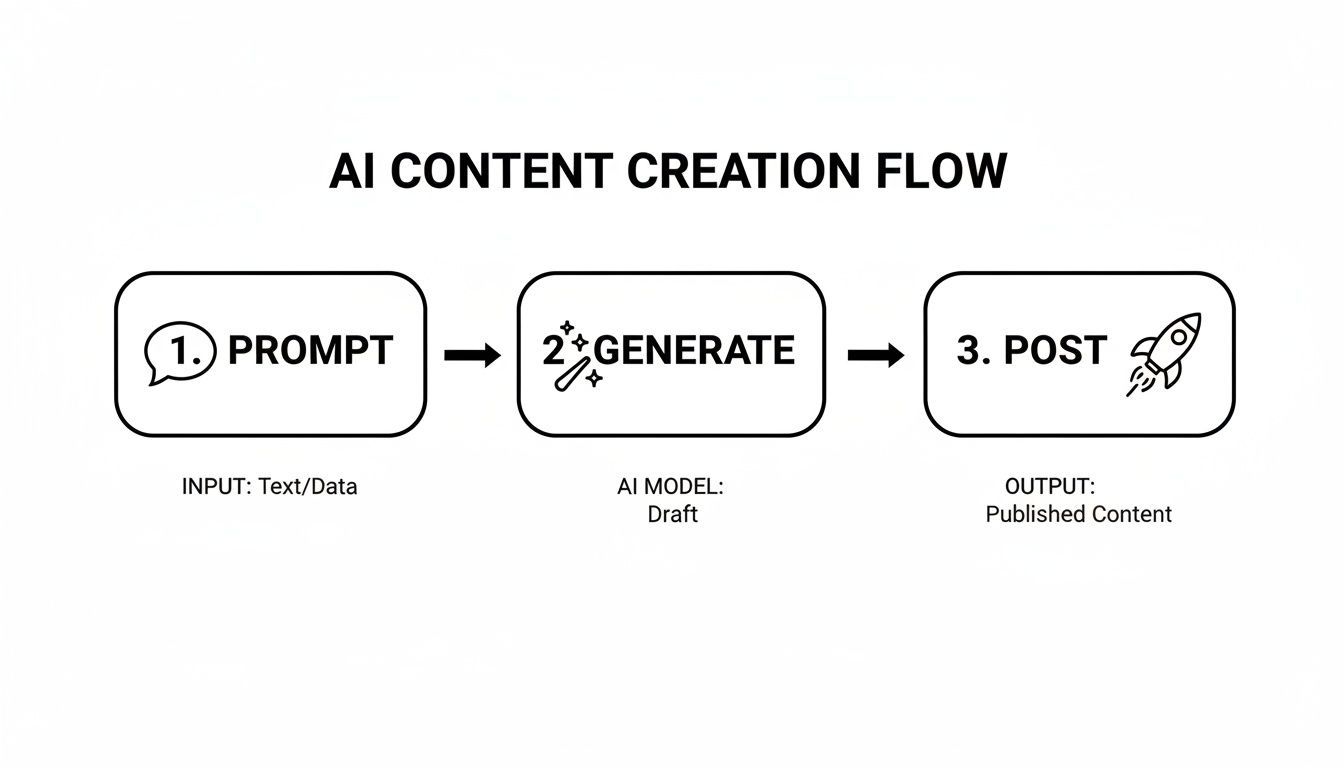
As you can see, the goal is to use a prompt to generate your content and then pipe it straight into your publishing system, cutting out a ton of manual busywork.
Don't let the idea of "automation" intimidate you. You absolutely do not need to be a developer. If you can figure out how to attach a file to an email, you can build a simple "Zap" or "Scenario" that will save you hours every single month. Start small.
Theory is great, but let's get practical. Here are a few simple but incredibly effective automation "recipes" you can set up in less than 15 minutes. Seriously.
Recipe 1: New Blog Post to Social Queue
Trigger: A new post goes live on your WordPress site. Action: Zapier automatically creates a draft post in Buffer with the blog title and link. Why it's awesome: You’ll never again forget to promote your new content. It lands directly in your queue, just waiting for you to add a slick image and hit schedule.
Recipe 2: Five-Star Review to Facebook Page
Trigger: Someone leaves a glowing 5-star review on your Google Business Profile. Action: Make instantly creates a post for your Facebook Page, sharing the awesome feedback. Why it's awesome: This turns your happiest customers into an automated social proof machine. It builds trust and credibility while you sleep.
Recipe 3: New YouTube Video to LinkedIn Post
Trigger: You upload a new public video to your YouTube channel. Action: The video link is immediately shared as a new update on your LinkedIn company page. Why it's awesome: Your content gets instant cross-platform promotion, grabbing as many eyeballs as possible right when it goes live.
By combining a solid scheduler with a few of these smart integrations, you've officially built your automated posting engine. It’s a system that doesn’t just save you a ton of time—it guarantees your best content and biggest wins are always in front of your audience.
Alright, so your content library is brimming with fantastic, AI-assisted assets, and your scheduling tool is raring to go. But just hitting 'publish' without a game plan? That's like handing the keys to a Ferrari to a 16-year-old with a new learner's permit. You'll get somewhere fast, but it probably won't be pretty.
This is the part where you stop being a social media manager and start being the architect of your own content machine. It's time to build a smart, self-sustaining system by setting up a solid posting calendar and some clever rules. This is how you make sure your automated feed feels human, not like it's being run by a soulless content-bot.
Forget the old "post once a day" advice. That’s a one-size-fits-none approach. Your audience on LinkedIn during their morning coffee is a completely different creature from the one endlessly scrolling TikTok at 10 PM. Every platform has its own unique vibe and peak times, and your schedule needs to reflect that.
Most modern schedulers like Buffer or Later have built-in analytics that are pure gold. They'll look at your past posts and tell you exactly when your audience is most likely to be online and engaged for each network. Let the data do the heavy lifting! It takes all the guesswork out of the equation.
A smart weekly schedule might look a little something like this:
LinkedIn: Two posts daily. One hits at 8:30 AM to catch the pre-work crowd, and another drops around 12:15 PM for the lunchtime scrollers. Instagram: A Reel goes live at 7:00 PM when people are unwinding. Sprinkle in three Stories throughout the day to keep things fresh. Facebook: One post around 9:00 AM and another in the early afternoon, say 1:00 PM, to capture different waves of engagement.
So, what happens on those crazy weeks when you have zero time to create anything new? Enter the evergreen content queue. This is your ace in the hole.
Think of it as a special folder in your scheduler packed with your timeless bangers—your best how-to guides, killer tips, glowing case studies, or foundational blog posts. These are the pieces that are always relevant.
Simply set up a rule in your scheduler to dip into this evergreen queue and automatically publish a post whenever a time slot is empty. It's a simple move that ensures you never have a silent day. Your feed stays active, the algorithm stays happy, and your audience keeps getting value, even when you're swamped.
Automation without a strategy is just a faster way to make a mess. Building platform-specific schedules and evergreen queues turns your system from merely efficient to truly intelligent. You're not just posting; you're delivering the right content to the right people at the perfect time.
This is where the real magic happens. Beyond just scheduling times, you can create rules that add those little touches of polish and personality to your posts automatically. This is how you make your automated content feel like you just typed it out moments ago.
Consider building rules for things like:
Automated Hashtags: Got a few core content pillars? Create specific hashtag groups for each one. Then, set a rule so that when you categorize a post as, say, "Healthy Meal Prep," your scheduler automatically tacks on your pre-approved list of #cleaneating, #mealprep, and #healthyrecipes tags. Easy peasy. Tagging Your Partners: If you regularly feature guest experts or collaborate with other brands, you can create a rule that automatically @-mentions their social handles in the caption whenever their name pops up. No more forgotten tags! Resurfacing Your Greatest Hits: This one is a total game-changer. Set up an automation to find your top-performing posts from 90 days ago and automatically add them back into your queue. This gives your best content a second life, getting it in front of all the new followers who missed it the first time around.
By putting these kinds of rules in place, you’re moving beyond just spraying content out into the world. You're building a precise, intelligent machine that maximizes the impact of every single post, finally turning that manual chaos into a thing of clockwork beauty.
Alright, your automation machine is built and running. But don't just walk away and expect magic to happen. This is where the real work—and the real fun—begins. You’ve set up the system; now it’s time to get in the pilot's seat and use data to fly this thing to the moon.
Think of it this way: true automation isn't about "set it and forget it." It's about creating a smart system that gets better over time, and that requires a little human guidance.
It’s so easy to get mesmerized by big, flashy numbers. Follower counts and total impressions might look great on a report, but they don't tell you the whole story. Are people actually paying attention? We need to look deeper.
Your scheduler's analytics dashboard is your new command center. This is where you'll find the signals that tell you if your strategy is actually working. To cut through the noise, I always recommend focusing on these three core metrics first:
Engagement Rate Per Post: This is the big one. It's the percentage of people who saw your post and cared enough to do something—like, comment, or share. A high engagement rate is the clearest sign that your content is resonating. Click-Through Rate (CTR): Are you trying to get people to your website, a landing page, or a product? If so, CTR is your lifeline. It tells you exactly how many people are taking that next step and clicking your links. Audience Growth Rate: Instead of just staring at your total follower count, look at the rate of growth. This tells you about your momentum. Are you gaining followers faster this month than last month? That’s a much better sign of a healthy, growing account.
If you want to go even further down the data rabbit hole, our complete guide on how to measure content performance will help you turn all those numbers into smart decisions.
The point of monitoring isn't just to report on what happened. It's to figure out why it happened so you can do more of what works and less of what doesn't.
Set aside a little time each week to check in. It doesn't have to be a huge production. Just look for trends. See which posts are taking off and which are duds. This is your feedback loop. It’s what turns your automation from a simple content-pusher into a genuine growth engine that learns and adapts with every single post.
You're probably buzzing with questions about automating your social media. It's totally normal. Let's dig into some of the big ones that always come up when people are starting out.
Nope, not if you're smart about it! The trick is to automate the posting, not the human connection. Automation should be your secret weapon for showing up consistently with great content, which actually frees you up to hang out in the comments and DMs where the real magic happens.
The real engagement killer isn't the tool; it's posting soulless, robotic junk. As long as what you're scheduling is genuinely valuable and you’re there to chat, your consistency can actually boost your engagement.
Ah, a classic question. Here’s a way I like to think about it, using a restaurant kitchen analogy:
A scheduler (like Buffer or Later) is the head chef. They know exactly when the dish needs to go out to the customer and they handle the final delivery—the posting.An integration tool (like Zapier or Make) is the super-efficient kitchen prep crew. They're the ones who see a new order come in (like a new blog post) and automatically get all the ingredients (the content) ready for the chef.
So, Zapier could notice you just published a new YouTube video and automatically create a draft post in your scheduler. Zapier does the connecting; the scheduler handles the publishing.
The best social media machines use both. The integration tool keeps your content pipeline full, and the scheduler makes sure it all goes out at the perfect time to make the biggest splash.
Look, the whole point is to save time, but "set it and forget it" is a recipe for disaster. You still need to be the pilot of the ship.
I've found a good rhythm is to pop in at least once or twice a day to check for comments, mentions, and messages. That's the stuff that needs a real human touch.
As for performance, a weekly review is perfect. Block out a little time to see what hit, what missed, and what you can learn. This lets you make small tweaks to your content plan or schedule for the next week instead of flying blind.
Ready to stop the endless cycle of manual content creation? With SendFame, you can generate a whole month's worth of eye-catching videos and images in just a few minutes. Say goodbye to creative burnout and hello to smart automation. Explore SendFame's AI tools now
Create Epic

SendFame

Create Epic with SendFame!
Questions: info@sendfame.com