Screen Recorder Mac: Pro Tips & 2026 Guide

screen recorder mac
Welcome offer — 56% OFF



Discover what a creative automation platform is, the core capabilities that matter, and how to evaluate one for marketing and creator workflows in 2026.
Your campaign brief is approved, the product shots are in Drive, the video edit is still half-finished, and someone just asked for three regional versions plus subtitles. That's usually the moment teams start stitching together design software, video editors, transcription tools, translation help, and a spreadsheet to keep version chaos under control. A creative automation platform exists to replace that stitching with one coordinated workflow, so the same campaign can move from concept to publish without losing the brand voice at every handoff.
The category is growing because that pain is common enough to justify serious software budgets. The creative automation software market is projected to rise from USD 2.51 billion in 2026 to USD 5.51 billion by 2031, a projection that implies a 17.03% CAGR over 2026 to 2031 (market projection and category context). A broader generative AI content market was estimated at USD 14.8 billion in 2024 and is projected to reach USD 80.12 billion by 2030, at a 32.5% CAGR from 2025 to 2030 (generative AI content market projection). Those numbers matter because they point to a shift from one-off experimentation to recurring production infrastructure.
What a Creative Automation Platform Actually Does Think orchestration, not a magic button What the platform replaces in practiceThe Core Building Blocks of Creative Automation Raw generation and structured templates Dynamic insertion, localization, and control Inspection and approval routingHow Marketers and Creators Use These Platforms The marketer's path from hero asset to campaign set The creator's path from one clip to many audiencesFrom Fragmented Toolchains to a Unified Creative Workspace Why the handoffs break production Why community and remix features matterHow Maxfusion AI Can Help What stands out for ad teams Where it fits bestHow to Evaluate a Creative Automation Platform Use a scorecard, not a leaderboard Creative Automation Platform Evaluation MatrixMeasuring ROI and Proving Creative Impact Start with a baseline you can defend Measure lift the right wayYour Implementation Checklist for a Smooth Rollout Weeks 1 to 2, pilot the core workflow Weeks 3 to 4, expand carefully Weeks 5 to 8, govern and verifyCommon Questions Buyers Ask Before They Sign Up
A lot of people first meet this category through a messy week. One person owns the static ads, another has the video timeline open, a third is waiting on subtitles, and a fourth is emailing a regional translation vendor while the spreadsheet of asset names gets longer by the hour. The platform doesn't magically create good taste, and it doesn't remove the need for review. It does something more practical, it orchestrates the work so a team can reuse one creative idea across formats, languages, and channels without rebuilding the same campaign from scratch.
The simplest way to understand a creative automation platform is as a control room. It connects the steps that usually live in separate tools, generation, assembly, checks, and distribution, inside one workspace. That means a marketer can feed in a product image, a headline, and a call to action, then branch that master into variants for social, display, or video without re-entering the same inputs in five places.
That orchestration model is what makes the market signal meaningful. When a category reaches multi-billion-dollar scale, buyers are usually paying for repeatable production, not novelty. The projected expansion in the market suggests that enterprise teams are treating automation as a durable layer for faster campaign production, versioning, and localization, not just a sandbox for prompt testing (market projection and category context).
Instead of a single “generate” button, think of a sequence. First comes content input, then a template or structure, then generation, then review, then export or publish. A good platform reduces the friction between those steps by keeping the brand assets, prompts, and approvals in one place. That's why the buyer question is rarely “Can it make something?” and more often “Can it keep making the right thing at scale?”
For a useful starting point on the tool landscape, see SendFame's overview of AI content creation tools. The important takeaway is that the category is not one product shape. Some tools are narrow and fast. Others act like production operating systems for teams that need repeatable output every week.
A practical definition helps keep expectations honest. Automation here means templated, repeatable production with human review, not a machine replacing creative judgment. If a platform can't support that handoff between speed and control, it's usually just a generator with a nicer interface.
The easiest way to understand this stack is as an assembly line with quality checks at each station. One station makes the raw parts, another assembles the parts into a brand-safe layout, another swaps in market-specific details, and another inspects the output before it ships. If one station is weak, the whole line slows down, which is why the value comes from how the blocks compose, not from any single model.
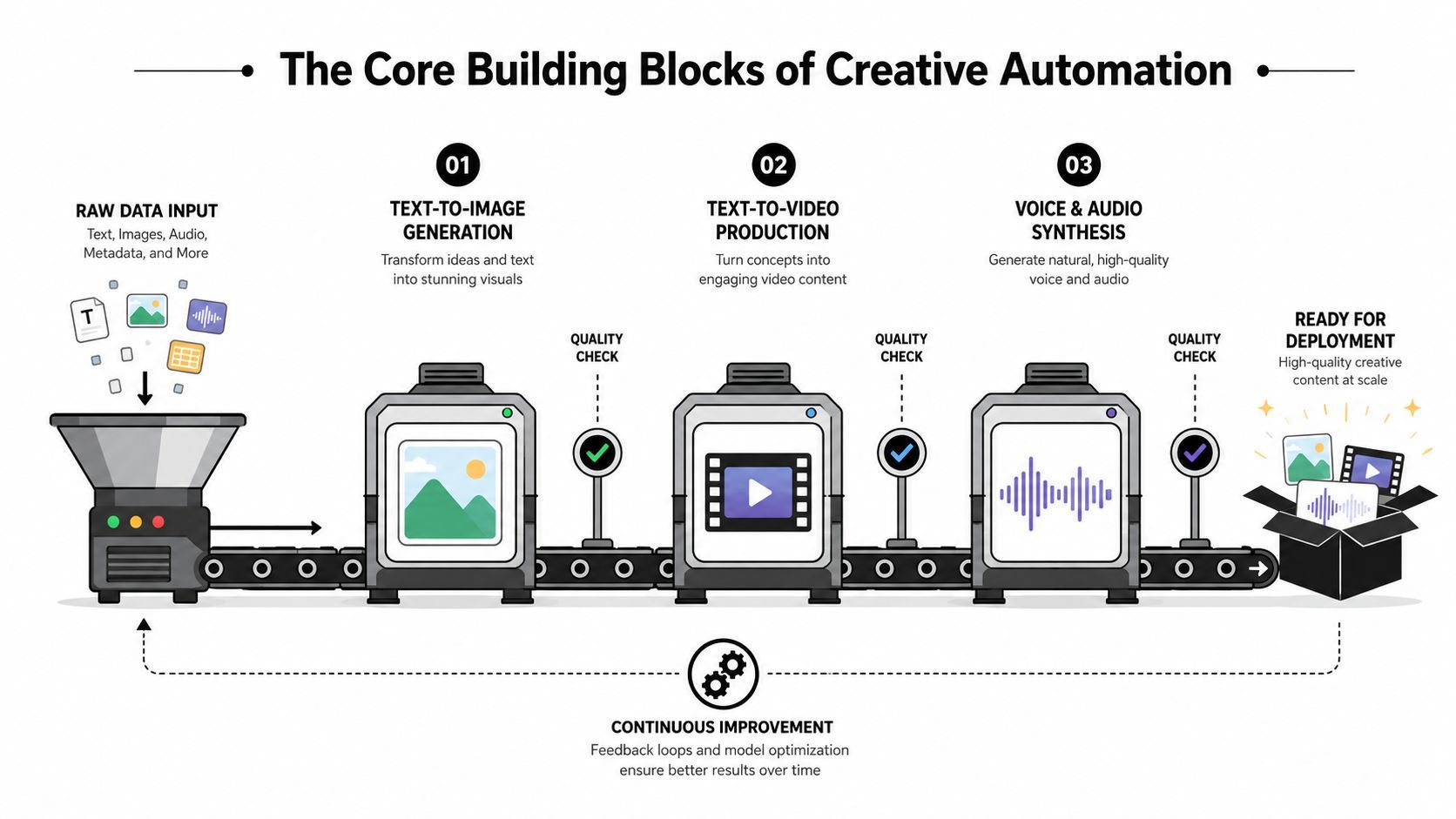
At the front of the line are the generation tools, usually text-to-image, text-to-video, and voice or audio synthesis. These are useful because they turn a brief into something visible or audible fast, which helps teams get from concept to review without waiting on a full production cycle. On their own, though, they're just starting points.
The next layer is where a platform starts to feel like a system instead of a toy. Template systems lock in composition, spacing, typography, and brand-safe placement so the team can swap headlines, product shots, or voice lines without breaking the design. That matters because versioning is where most production time disappears. A template keeps the shape of the campaign intact while letting the variables change.
Practical rule: if a vendor can generate assets but can't preserve layout rules, it's not automating production, it's just creating more cleanup work.
Once the template exists, dynamic asset insertion becomes the true time-saver. Instead of recreating each variation manually, the platform swaps copy, product imagery, pricing language, or audience-specific lines from a feed or data source. That's the part that helps a single creative concept become many campaign variants without a fresh file for each market.
Localization adds another layer, especially when the platform supports multi-language lip sync. The point isn't just translation, it's making the spoken or sung output fit the visual performance and feel native enough to publish. In a practical demo, ask the vendor how it handles consistency across languages, because many tools can translate text but still fail when the mouth movement, timing, or tone looks off.
The last station is quality control. Good systems use version history, approval routing, and human review to catch mistakes before distribution. Those inspectors matter because automation can speed up the wrong answer just as easily as the right one. A platform that supports review loops, comment threads, and locked approvals is doing real production work, not just generation.
If you're comparing vendors, the quickest filter is to ask whether they cover four to six things well, generation, templates, dynamic insertion, localization, review, and version control. For a broader tool list, SendFame's best AI tools for content creation guide is a useful companion. The details differ across products, but the building blocks stay the same.
A marketer and a creator may both use the same platform, but they're solving different bottlenecks. The marketer wants more variants, tighter coordination, and less time lost in approval loops. The creator wants a single idea to travel farther, across formats and audiences, without reshooting the same content three times.
Start with one strong product image or one master offer creative. In a unified workspace, that hero asset can branch into short-form video ads, static social variants, and audio spots without rebuilding the campaign from zero. The template carries the structure, the data feed carries the variables, and the review queue keeps the brand team from chasing files across multiple tools.
That workflow is why a platform can change the production sequence even when the team is small. Instead of waiting for a designer to export every size, a marketer can adjust one headline, swap one product shot, and update a market-specific offer in the same place. The result is less time spent on exports and more time spent on deciding which message deserves another test.
Creators usually care about reach, reuse, and speed. A single origin clip can become a remixed social post, a localized version with lip sync, or a new format for a different platform if the system keeps the visual core intact. That's especially useful when the platform supports image-to-video or community remixing, because a finished idea can become the starting point for the next draft instead of a dead-end asset.
A strong workflow does not replace the creator's judgment. It reduces the number of times that judgment has to fight file exports, subtitle passes, and version confusion.
The other value is that the path from draft to publish becomes a review-and-publish loop, not a render-and-repeat loop. Once the team trusts the template, they spend less energy on mechanical work and more on message quality. That matters for both paid campaigns and organic content, because the underlying production pain is the same even if the channel changes.
For marketers who want a practical playbook, SendFame's guide to using AI for marketing is a useful reference point. The capability that solves the pain depends on the persona, dynamic templates for the marketer, remix and lip sync for the creator, and shared asset logic for both.
The old workflow is familiar because almost everyone has lived it. One tool writes the script, another makes the voice, a third edits the video, a fourth handles localization, and a fifth tracks performance. Each handoff creates file exports, naming problems, version drift, and the awkward moment when nobody is sure which file has the latest brand-approved copy.
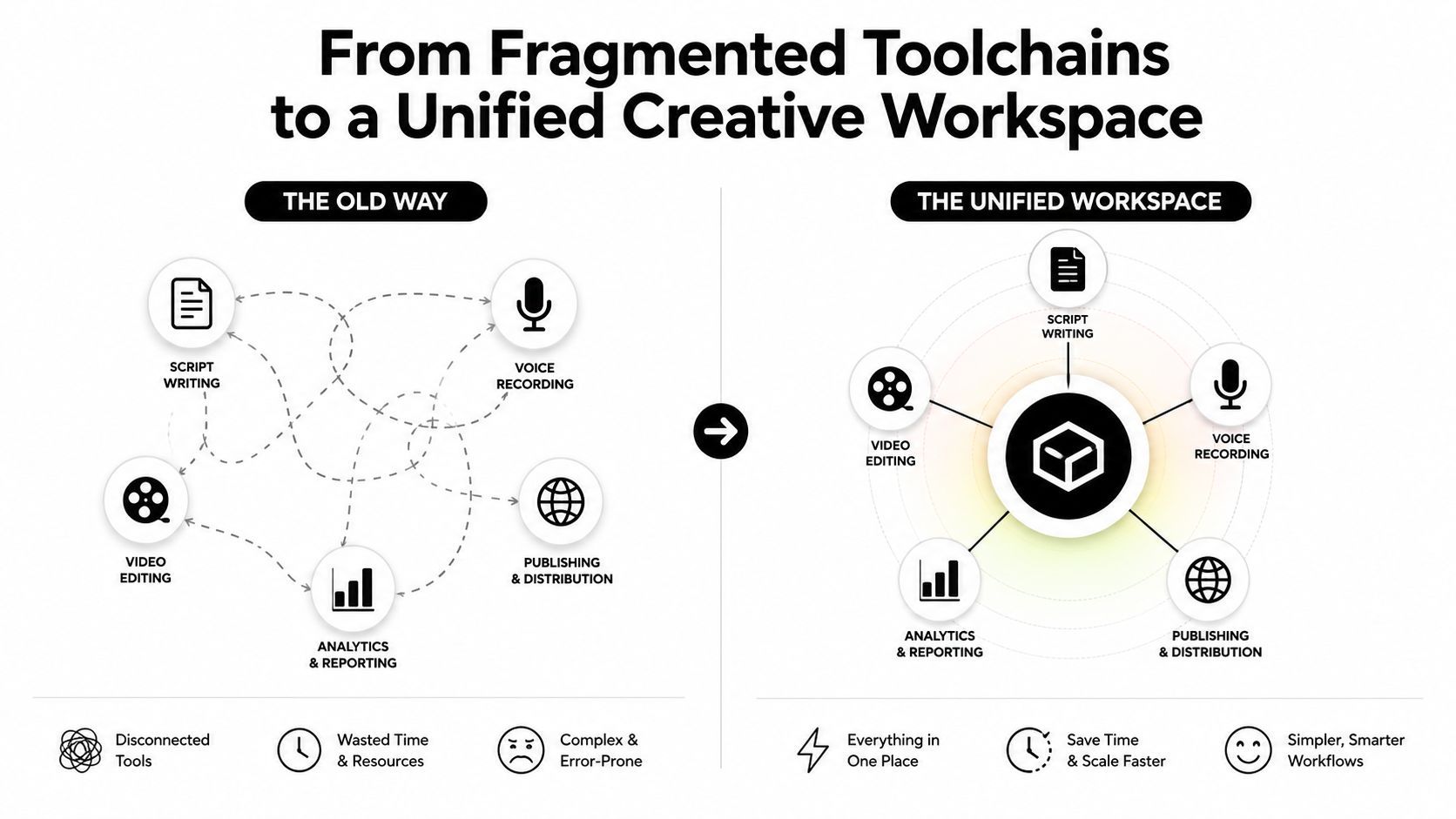
Every extra tool adds a decision point. Someone has to export the asset, someone else has to import it, and another person has to notice when the brand context got stripped away. If the campaign changes late, the team often has to repeat that chain from the start. The cost is not just labor, it's the delay between creative intent and something publishable.
A unified workspace changes that by keeping text-to-video, image-to-video, text-to-music, and multi-language lip sync behind one login with shared assets and brand presets. That means the team can start from the same prompt set, the same template logic, and the same approval flow instead of rebuilding the workflow around each output type. The platform becomes a shared production layer rather than a pile of disconnected subscriptions.
Community galleries and remix features are more than inspiration walls. They let a team fork a working structure instead of rebuilding one from scratch, which is especially useful when a template already proved useful for another campaign or creator format. That shifts the production habit from “start blank” to “adapt what already works.”
Operational gain: when the platform stores prompts, assets, and template logic together, the team stops losing context every time the work changes format.
This is also where the platform begins to feel like a workspace rather than a generator. One billing surface, one review queue, and fewer vendor contracts make the day-to-day work easier to manage. For teams that run many campaigns, that kind of consolidation often matters as much as the generation quality itself.
If you want a broader framework for scaling the work once the toolset is unified, SendFame's content scaling guide is a helpful companion. The main shift is operational, fewer handoffs, less context loss, and a cleaner path from idea to publish.
If your team's biggest problem is ad production at speed, Maxfusion AI is worth a look because it's built around one workflow rather than a set of disconnected tools. It combines competitor research, concept development, AI image and video generation, and final assembly in a single browser-based system, and it's also accessible through MCP connectors in chat environments such as Claude, ChatGPT, Cursor, and Hermes. For a closer look at the product itself, the company's creative automation platform page is the most direct starting point.
The platform's canvas, called MaxFlows, ties research, ideation, generation, and editing together visually. That matters if you want one place to move from a competitor ad reference to a concept, then into generated assets and final assembly without bouncing between tabs. It also includes research tools for Meta Ad Library pulls and TikTok trend analysis, which helps teams anchor creative decisions in live market signals rather than only in internal opinions.
The product is also unusually broad on the generation side. It supports multiple image models, several video models, a UGC-style audio-guided model called RIZZ, and production tools such as lip sync, voice cloning, background removal, and video extension. It also offers an Actor Library with 300+ AI actors, consent-based cloning from short footage, and support for 35+ languages. Those capabilities are most relevant when a team needs many ad variations quickly and wants to keep continuity across versions.
Maxfusion AI makes the most sense when a team wants an end-to-end ad factory inside one workspace, especially if the work volume is high and the process depends on repeated iteration. Its credit-based plans, batch production orientation, and public API point toward teams that care about throughput and workflow consolidation. If your priority is a single environment for research, generation, and assembly, it's a practical fit.
If your main need is a narrow feature like only image resizing or only one media type, it may be more platform than you need. The right question is whether you want an orchestration layer for ad production or just a standalone generator. Maxfusion AI is built for the first case.
A good evaluation starts with fit, not feature envy. Teams usually get stuck when they compare every platform against every possible use case instead of scoring the one thing that matters most, can this system reduce production friction without creating a new approval mess. The right rubric separates media coverage, control, collaboration, and governance so the decision stays tied to workflow, not hype.
The most useful question is whether the platform covers the media types you ship. If your campaigns span video, image, and audio, you want one workspace that can handle all three without siloing the files. If a vendor says it supports those formats but makes you jump into separate products or separate billing tiers, that's a sign the platform is fragmented behind the scenes.
The next question is control. Can the system preserve templates, enforce brand rules, and route approvals in a way that matches how your team already works? If the answer is no, more generation speed just means faster cleanup. The user study that found text-to-image AI increased human creative productivity by 25% and raised the probability of receiving a favorite per view by 50% is a useful reminder that the workflow matters as much as the output, because the gain came from compressing ideation and production into one assisted flow (creative productivity analysis).
| Criterion | Diagnostic Question | What Good Looks Like | Red Flag |
|---|---|---|---|
| Media coverage | Does one workspace handle video, image, and audio? | Shared assets and templates across formats | Separate products for each media type |
| Generation control | Can I lock layouts, brand rules, and review steps? | Templates, version history, approval routing | Fast output with no QC layer |
| Localization | Does it support translation, lip sync, and market-specific variants? | Output that stays coherent across languages | Localization added as a manual export step |
| Collaboration | Can teams share workspaces, comment, and remix safely? | Clear roles, shared libraries, forkable templates | Files get copied into private silos |
| Governance | Are usage rights, brand safety, and API access documented? | Transparent controls and admin visibility | Vague policies and no audit trail |
A few red flags are worth calling out directly. If audio is siloed from video, the platform is probably not designed for actual campaign production. If localization is locked behind an enterprise-only tier, the vendor may be using a core workflow as upsell leverage. If it won't explain how data, assets, and outputs are handled, the legal and brand-risk burden shifts to your team.
The platform has to help a manager defend the rollout, not just excite a creator in a demo. That means asking whether it can save time, lower production friction, and support a review process your team can live with quarter after quarter. The best tool is the one your team can govern.
The cleanest ROI story starts before launch. If you don't baseline the current process, every later gain gets argued over in meetings. A practical rollout tracks three layers, time saved per asset, cost per asset versus the old workflow, and downstream performance in engagement, click-through, or conversion.
Before rollout, record the current cycle time from brief to publish, the labor or vendor cost per asset, and one control campaign you can keep stable while the new workflow runs. That gives finance and leadership something concrete to compare against later. The point isn't to claim every saved hour becomes immediate headcount reduction, it's to show that the new workflow changes how much creative capacity the team can produce with the same people.
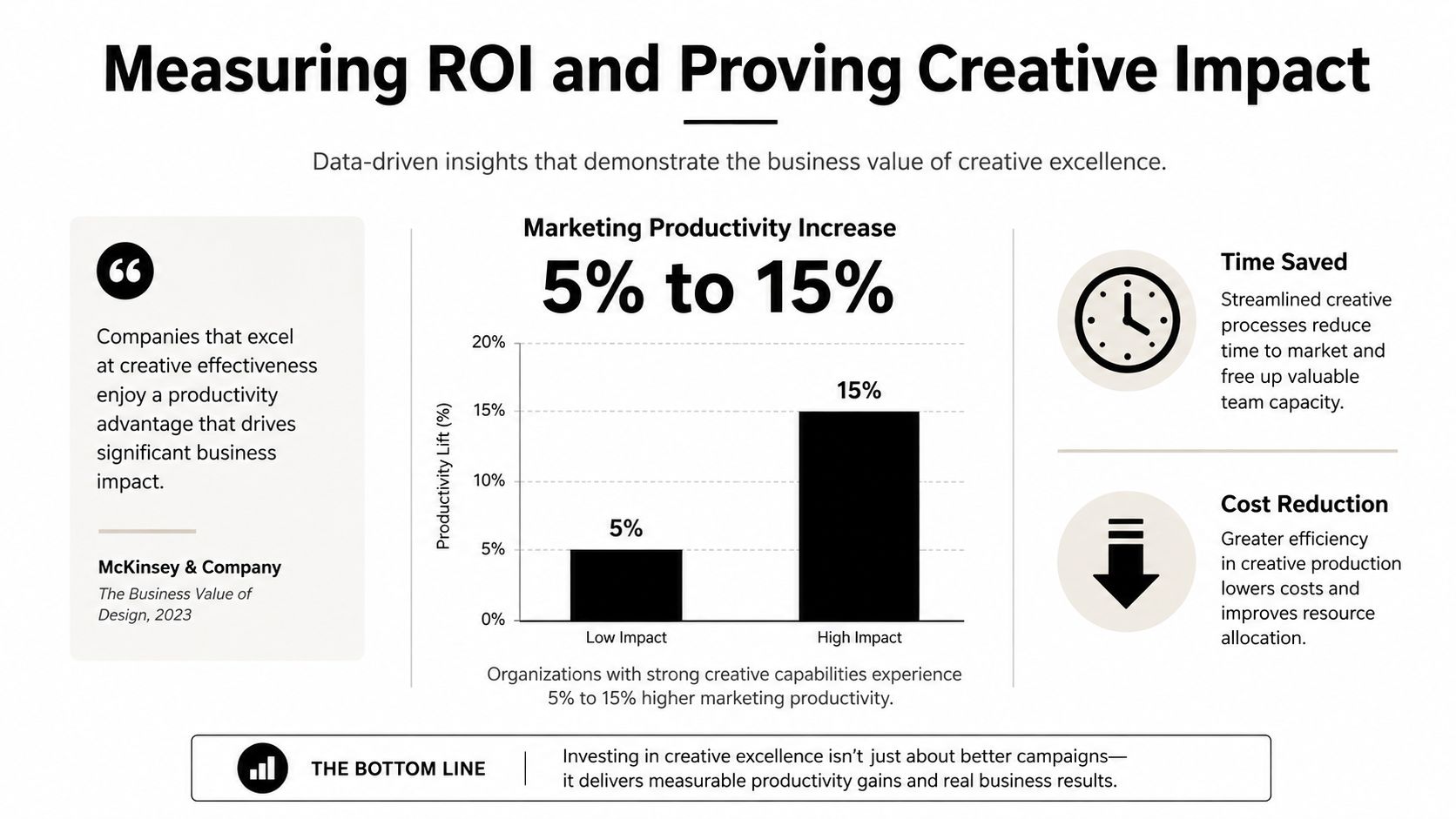
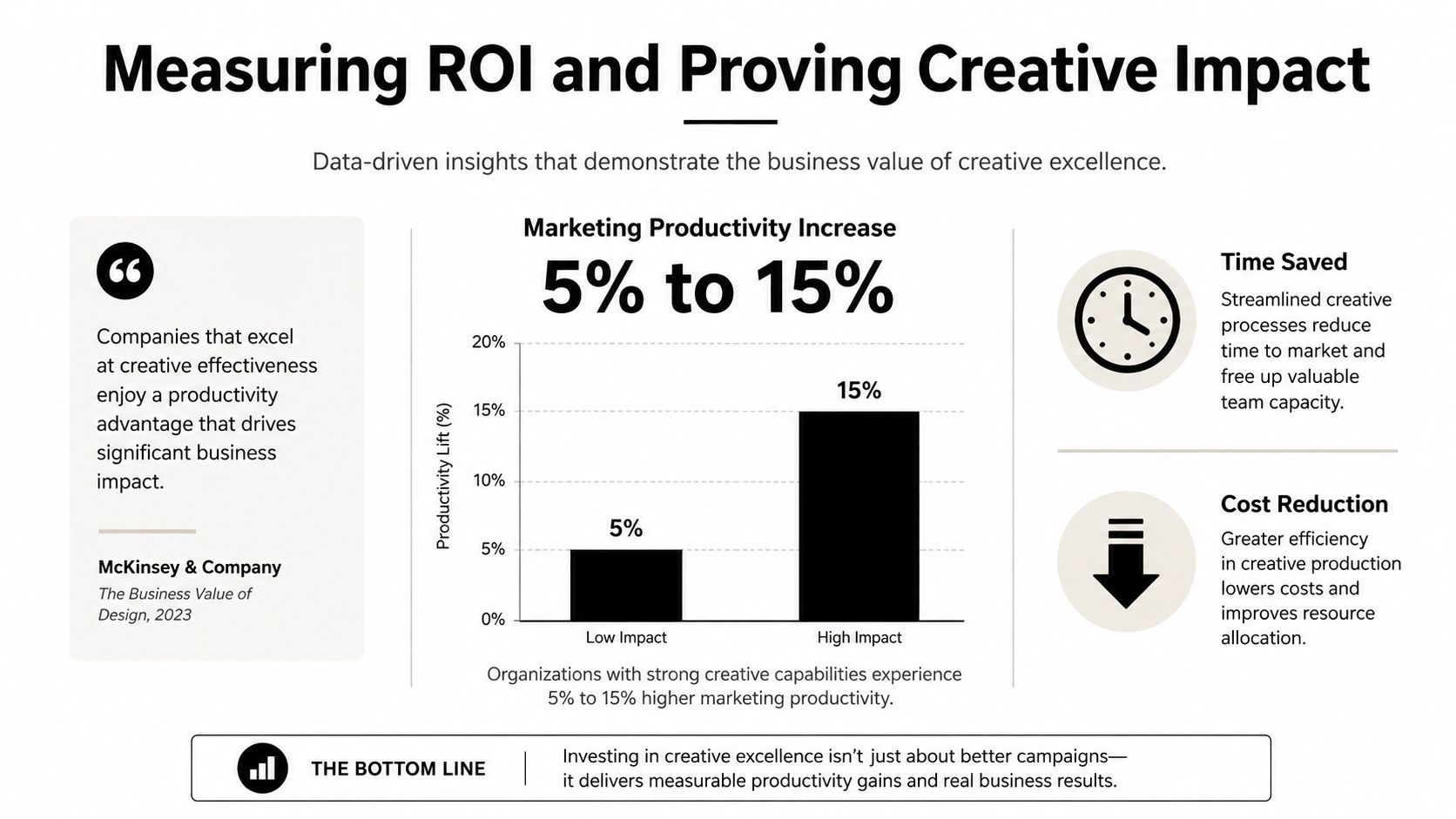
A useful external anchor comes from McKinsey's work on generative AI, which has been associated with marketing function productivity improvements of 5 to 15 percent of total spend in the context of creative excellence (productivity chart and study reference). That doesn't mean every platform gets the same result. It means the business case should include workflow efficiency as well as media outcomes.
A simple rollout can use holdout audiences or phased regional launches so you can isolate the effect of the new creative system. If one region uses the automated workflow and another keeps the old process, you get a cleaner comparison than if everything changes at once. That's especially important when many campaign variables move together, because creative platform benefits can be masked by media changes or seasonality.
The reporting cadence should pair operational metrics with business metrics. If cycle time drops but performance worsens, the platform isn't helping. If production gets faster and the creative tests improve, you have a stronger case for scaling. Keep the review aligned with how leadership thinks, not just how the creative team works.
The verification step people skip is the one that protects the budget later. Before broader rollout, compare automated output against a human baseline on fidelity, brand voice, and lip-sync accuracy. If the automated route doesn't hold up there, the apparent speed gain will disappear in cleanup.
A smooth rollout usually starts smaller than the team wants and ends more carefully than they expect. The safest path is a narrow pilot, one campaign, one market, one template, then a controlled expansion once the review process and brand rules are working. That keeps the project from turning into a platform migration with no clear owner.
Start by defining the creative brief inputs the platform must accept. That usually means headline, body copy, product imagery, aspect ratios, language variant, and approval owner. Connect the brand asset library and make sure the template can pull the right files without a manual search each time.
Then configure a single workflow for video, image, audio, and localized variants if the platform supports them. Keep legal and accessibility review in the loop from day one, because retrofitting compliance after the team trusts the process is where delays show up. If the platform offers community or remix features, set usage rules immediately so no one forks a draft outside policy.
Once the pilot works, add one more campaign or market and test whether the template logic survives a real production load. Approval routing matters here, because the platform should be able to show who changed what and who signed off. If the review chain still lives in email, the workspace isn't unified yet.
At this stage, build a short list of failure points to watch, broken crop logic, missing subtitles, wrong language version, or a brand element that moved. Those errors are normal in early setup, but they should get less frequent as the template matures. If they don't, the workflow needs a tighter constraint model, not more people checking it manually.
Governance is where the rollout becomes sustainable. Define who can create, who can edit, who can approve, and who can publish. Make sure the platform's usage policy covers remix rights, asset retention, and any API connections the team plans to use.
The final step many teams skip is the pre-launch QA loop. Compare automated outputs against a human baseline on brand voice, fidelity, and lip-sync accuracy before scaling the workflow across more campaigns. That step protects the team from shipping a fast output that still needs three rounds of cleanup.
The first question is where end-to-end automation stops. In most teams, the answer is still human-led at the brief stage, the final approval stage, and the legal sign-off stage. Automation can accelerate assembly and variation, but it shouldn't be the final arbiter of brand judgment.
The second question is how multi-language lip sync handles different languages without making the output look off. Buyers should ask about dialect support, mouth-shape accuracy, timing, and whether the voice still sounds like the same brand in each market. Translation alone isn't enough if the visual performance breaks when the language changes.
The third question is what the platform keeps. Teams should understand what happens to source assets, generated outputs, prompts, and remixable community work, especially if multiple editors or agencies touch the same project. If the vendor can't explain ownership and retention in plain language, that's a governance problem, not a support issue.
The fourth question is what throughput looks like after launch. Early production is usually slower because the team is still shaping templates and prompts, and the first few campaigns often expose edge cases. After refinement, the platform should reduce friction, but stakeholders should expect steady improvement rather than instant perfection.
A good buyer also asks where community features stop being helpful and start becoming risky. Remixing can speed up ideation, but it also needs clear rules around approval, attribution, and version control. The safest answer is not to avoid remixing, it's to set the guardrails before the team depends on it.
If you're evaluating tools now, pick one pilot campaign, one market, and one approval path, then test whether the platform can carry the workflow from brief to publish without breaking brand control. Build the scorecard, compare the outputs against a human baseline, and choose the system your team can govern.
Create Epic

SendFame

Create Epic with SendFame!
Questions: info@sendfame.com